Struggling to connect your Hotwav phone to your PC? A missing Hotwav USB Driver is almost always the reason your computer won’t recognize the device. Without it, Windows can’t transfer files, flash firmware, or even charge properly through data mode. The good news? Fixing it takes less than five minutes.
In this guide, you’ll get direct download links for every Hotwav model, plus two simple installation methods that work on any Windows PC. So, whether you’re a student backing up photos or a developer flashing a custom ROM, you’re covered.
📌 Table of Contents
- What is Hotwav USB Driver?
- What is Hotwav ADB Driver?
- Why Do You Need Hotwav USB Driver?
- System Requirements
- Hotwav USB Driver Download — All Models
- How to Install Hotwav USB Driver
- Troubleshooting Common Issues
- FAQ
- Conclusion
💻 What is Hotwav USB Driver?
A Hotwav USB Driver is a small piece of software that lets your Windows PC talk to your Hotwav smartphone. Think of it as a translator. Your phone speaks one language, your computer speaks another, and the driver sits in between, making sure both understand each other.
Without this driver, your PC often shows an “Unknown Device” error. Because of that, your phone won’t show up in File Explorer at all.
For example, if you want to move 500 vacation photos from your Hotwav Cyber 15 to your laptop, you’ll need this driver installed first. The same goes for flashing a stock ROM, rooting your device, or recovering lost data with specialized software.
⚙️ What is Hotwav ADB Driver?
ADB stands for Android Debug Bridge. The Hotwav ADB Driver is a bit different from the regular USB driver. It’s built for deeper, command-level communication between your PC and your phone.
So, if you’ve ever seen a YouTube tutorial where someone types commands into a black command-prompt window to unlock a bootloader, that’s ADB at work. Developers, modders, and advanced users rely on it constantly.
💡 Pro Tip: If you only want to transfer files or charge your phone, you likely need just the standard USB driver. ADB is mainly for flashing, rooting, or debugging apps.
🔥 Why Do You Need Hotwav USB Driver?
Not sure why this small file matters so much? Here’s what it actually unlocks for you:
- ✅ Transfer photos, videos, and documents between phone and PC
- ✅ Flash stock ROM or firmware if your Hotwav phone gets stuck in a boot loop
- ✅ Root your device safely using tools like ADB and Fastboot
- ✅ Recover data using third-party recovery software
- ✅ Use your phone as a modem or update device drivers manually
- ✅ Fix “USB device not recognized” errors in Windows
For instance, if you want to flash a custom recovery like TWRP on your Hotwav R9 Ultra 5G, you’ll need How to install ADB Fastboot set up ADB and Fastboot on your PC — before anything else works.
📊 System Requirements
Before downloading, check that your computer meets these basics. Most Windows PCs already qualify.
- Operating System: Windows 7, 8, 8.1, 10, or 11 (32-bit and 64-bit)
- Free Disk Space: At least 100 MB
- USB Cable: Original or high-quality Hotwav-compatible cable
- Administrator Access: Required to install drivers
- Internet Connection: Needed only to download the driver file
🚀 Hotwav USB Driver Download — All Models
Below is the complete, updated list of Hotwav USB drivers. It covers every model released from the brand’s earliest devices right through to 2026. Simply find your model and click Download.
📌 Important: The same universal driver package works for all Hotwav models listed below. You don’t need a different file for each phone.
| # | Hotwav Model | Year | Download Link |
|---|---|---|---|
| 1 | Hotwav A18 | Legacy (pre-2022) | Download |
| 2 | Hotwav A28 Plus | Legacy (pre-2022) | Download |
| 3 | Hotwav A38 | Legacy (pre-2022) | Download |
| 4 | Hotwav A48 | Legacy (pre-2022) | Download |
| 5 | Hotwav A58 | Legacy (pre-2022) | Download |
| 6 | Hotwav A68 | Legacy (pre-2022) | Download |
| 7 | Hotwav A16 Pro Max | 2025 (approx.) | Download |
| 8 | Hotwav A17 Pro Max | 2025 (approx.) | Download |
| 9 | Hotwav A36 | 2025 (approx.) | Download |
| 10 | Hotwav A56 | 2026 (approx.) | Download |
| 11 | Hotwav C5 | Legacy (pre-2022) | Download |
| 12 | Hotwav C5 Plus | Legacy (pre-2022) | Download |
| 13 | Hotwav Cosmos S8 | Legacy (pre-2022) | Download |
| 14 | Hotwav Cosmos V1 | Legacy (pre-2022) | Download |
| 15 | Hotwav Cosmos V2 | Legacy (pre-2022) | Download |
| 16 | Hotwav Cosmos V2+ | Legacy (pre-2022) | Download |
| 17 | Hotwav Cosmos V3 | Legacy (pre-2022) | Download |
| 18 | Hotwav Cosmos V4 | Legacy (pre-2022) | Download |
| 19 | Hotwav Cosmos V5 | Legacy (pre-2022) | Download |
| 20 | Hotwav Cosmos V6 | Legacy (pre-2022) | Download |
| 21 | Hotwav Cosmos V8 | Legacy (pre-2022) | Download |
| 22 | Hotwav Cosmos V9 | Legacy (pre-2022) | Download |
| 23 | Hotwav Cosmos V13 | Legacy (pre-2022) | Download |
| 24 | Hotwav Cosmos V15 | Legacy (pre-2022) | Download |
| 25 | Hotwav Cosmos V16 | Legacy (pre-2022) | Download |
| 26 | Hotwav Cosmos V17 | Legacy (pre-2022) | Download |
| 27 | Hotwav Cosmos V19 | Legacy (pre-2022) | Download |
| 28 | Hotwav Cosmos V19+ | Legacy (pre-2022) | Download |
| 29 | Hotwav Cosmos V20 | Legacy (pre-2022) | Download |
| 30 | Hotwav Cosmos V21 | Legacy (pre-2022) | Download |
| 31 | Hotwav Cosmos V22 | Legacy (pre-2022) | Download |
| 32 | Hotwav Cosmos V23 | Legacy (pre-2022) | Download |
| 33 | Hotwav Cosmos V811 | Legacy (pre-2022) | Download |
| 34 | Hotwav Cyber 7 | Legacy (pre-2022) | Download |
| 35 | Hotwav Cyber 8 | Legacy (pre-2022) | Download |
| 36 | Hotwav Cyber 9 Pro | Legacy (pre-2022) | Download |
| 37 | Hotwav Cyber X | 2022 (approx.) | Download |
| 38 | Hotwav Cyber X Pro | 2022 (approx.) | Download |
| 39 | Hotwav Cyber 13 | 2023 (approx.) | Download |
| 40 | Hotwav Cyber 13 Pro | 2023 (approx.) | Download |
| 41 | Hotwav Cyber 15 | 2024 (approx.) | Download |
| 42 | Hotwav Cyber 16 Pro | 2025 (approx.) | Download |
| 43 | Hotwav Cyber 17 | 2026 (approx.) | Download |
| 44 | Hotwav Cyber 18 | 2026 (approx.) | Download |
| 45 | Hotwav Fone 526G | Legacy (pre-2022) | Download |
| 46 | Hotwav H1 | Legacy (pre-2022) | Download |
| 47 | Hotwav Hero S7 | Legacy (pre-2022) | Download |
| 48 | Hotwav Hero V5 | Legacy (pre-2022) | Download |
| 49 | Hotwav Hero V6M | Legacy (pre-2022) | Download |
| 50 | Hotwav Hero V7 | Legacy (pre-2022) | Download |
| 51 | Hotwav Hero V8 | Legacy (pre-2022) | Download |
| 52 | Hotwav Hero V8 Plus | Legacy (pre-2022) | Download |
| 53 | Hotwav Hyper 7 | 2025 (approx.) | Download |
| 54 | Hotwav Hyper 7 Pro | 2024 (approx.) | Download |
| 55 | Hotwav Hyper 7s | 2025 (approx.) | Download |
| 56 | Hotwav Hyper 8 Pro | 2025 (approx.) | Download |
| 57 | Hotwav Hyper 8 Ultra | 2025 (approx.) | Download |
| 58 | Hotwav IP6 | Legacy (pre-2022) | Download |
| 59 | Hotwav IP7s | Legacy (pre-2022) | Download |
| 60 | Hotwav IP8 | Legacy (pre-2022) | Download |
| 61 | Hotwav N6282 | Legacy (pre-2022) | Download |
| 62 | Hotwav N6582 | Legacy (pre-2022) | Download |
| 63 | Hotwav N6680 | Legacy (pre-2022) | Download |
| 64 | Hotwav N6780 | Legacy (pre-2022) | Download |
| 65 | Hotwav N6782 | Legacy (pre-2022) | Download |
| 66 | Hotwav N8182 | Legacy (pre-2022) | Download |
| 67 | Hotwav N8282 | Legacy (pre-2022) | Download |
| 68 | Hotwav N8380 | Legacy (pre-2022) | Download |
| 69 | Hotwav N8682 | Legacy (pre-2022) | Download |
| 70 | Hotwav N8880 | Legacy (pre-2022) | Download |
| 71 | Hotwav N9182 | Legacy (pre-2022) | Download |
| 72 | Hotwav N9980 | Legacy (pre-2022) | Download |
| 73 | Hotwav Note 12 | Legacy (pre-2022) | Download |
| 74 | Hotwav Note 12 EF | 2023 (approx.) | Download |
| 75 | Hotwav Note 12 2024 | 2024 | Download |
| 76 | Hotwav Note 13 | 2023 (approx.) | Download |
| 77 | Hotwav Note 13 Pro | 2023 (approx.) | Download |
| 78 | Hotwav Note 13 Max | 2024 (approx.) | Download |
| 79 | Hotwav Note 15 | 2024 (approx.) | Download |
| 80 | Hotwav Note 15 Pro | 2024 (approx.) | Download |
| 81 | Hotwav Note 16 | 2025 (approx.) | Download |
| 82 | Hotwav Note 16 Pro | 2025 (approx.) | Download |
| 83 | Hotwav Note 18 GT | 2026 (approx.) | Download |
| 84 | Hotwav Note 18 Pro | 2026 (approx.) | Download |
| 85 | Hotwav Pad 11 | 2024 (approx.) | Download |
| 86 | Hotwav Pad 12 | 2025 (approx.) | Download |
| 87 | Hotwav Pad 13 | 2025 (approx.) | Download |
| 88 | Hotwav Pad 13 Pro | 2026 (approx.) | Download |
| 89 | Hotwav Pearl K2 | Legacy (pre-2022) | Download |
| 90 | Hotwav Pearl K3 | Legacy (pre-2022) | Download |
| 91 | Hotwav pixel 4 | Legacy (pre-2022) | Download |
| 92 | Hotwav R5 | 2024 (approx.) | Download |
| 93 | Hotwav R6 | Legacy (pre-2022) | Download |
| 94 | Hotwav R6 Pro | 2024 (approx.) | Download |
| 95 | Hotwav R6 Ultra | 2024 (approx.) | Download |
| 96 | Hotwav R7 | 2025 (approx.) | Download |
| 97 | Hotwav R8 | 2025 (approx.) | Download |
| 98 | Hotwav R9 Pro | 2025 (approx.) | Download |
| 99 | Hotwav R9 Plus | 2025 (approx.) | Download |
| 100 | Hotwav R9 Ultra 5G | 2025 (approx.) | Download |
| 101 | Hotwav R10 Pro | 2026 (approx.) | Download |
| 102 | Hotwav R11 Pro | 2026 (approx.) | Download |
| 103 | Hotwav Symbol | Legacy (pre-2022) | Download |
| 104 | Hotwav Symbol X 3G | Legacy (pre-2022) | Download |
| 105 | Hotwav T5 Pro | Legacy (pre-2022) | Download |
| 106 | Hotwav T7 | 2023 (approx.) | Download |
| 107 | Hotwav T7 Pro | 2024 (approx.) | Download |
| 108 | Hotwav T7S | 2025 (approx.) | Download |
| 109 | Hotwav Venus R2 | Legacy (pre-2022) | Download |
| 110 | Hotwav Venus R3 | Legacy (pre-2022) | Download |
| 111 | Hotwav Venus R6 | Legacy (pre-2022) | Download |
| 112 | Hotwav Venus R7 | Legacy (pre-2022) | Download |
| 113 | Hotwav Venus R8 | Legacy (pre-2022) | Download |
| 114 | Hotwav Venus R9 | Legacy (pre-2022) | Download |
| 115 | Hotwav Venus R10 | Legacy (pre-2022) | Download |
| 116 | Hotwav Venus V10 | Legacy (pre-2022) | Download |
| 117 | Hotwav Venus X1 | Legacy (pre-2022) | Download |
| 118 | Hotwav Venus X2 | Legacy (pre-2022) | Download |
| 119 | Hotwav Venus X3 | Legacy (pre-2022) | Download |
| 120 | Hotwav Venus X5 | Legacy (pre-2022) | Download |
| 121 | Hotwav Venus X6 | Legacy (pre-2022) | Download |
| 122 | Hotwav Venus X8 | Legacy (pre-2022) | Download |
| 123 | Hotwav Venus X9 | Legacy (pre-2022) | Download |
| 124 | Hotwav Venus X10 | Legacy (pre-2022) | Download |
| 125 | Hotwav Venus X11 | Legacy (pre-2022) | Download |
| 126 | Hotwav Venus X12 | Legacy (pre-2022) | Download |
| 127 | Hotwav Venus X14 | Legacy (pre-2022) | Download |
| 128 | Hotwav Venus X15 | Legacy (pre-2022) | Download |
| 129 | Hotwav Venus X16 | Legacy (pre-2022) | Download |
| 130 | Hotwav Venus X17 | Legacy (pre-2022) | Download |
| 131 | Hotwav Venus X19 | Legacy (pre-2022) | Download |
| 132 | Hotwav W10 | Legacy (pre-2022) | Download |
| 133 | Hotwav W10 Pro | Legacy (pre-2022) | Download |
| 134 | Hotwav W11 | 2023 (approx.) | Download |
| 135 | Hotwav X100GT | 2026 (approx.) | Download |
💡 Pro Tip: Can’t find your exact model number? Download the universal package instead — Download Universal ADB driver with installation guide — download the universal Android USB driver, which works with nearly every Hotwav device.
👉 How to Install Hotwav USB Driver
Not sure which method to choose? Don’t worry — both work perfectly fine. Pick whichever feels easier for you.
Method 1: Via EXE File
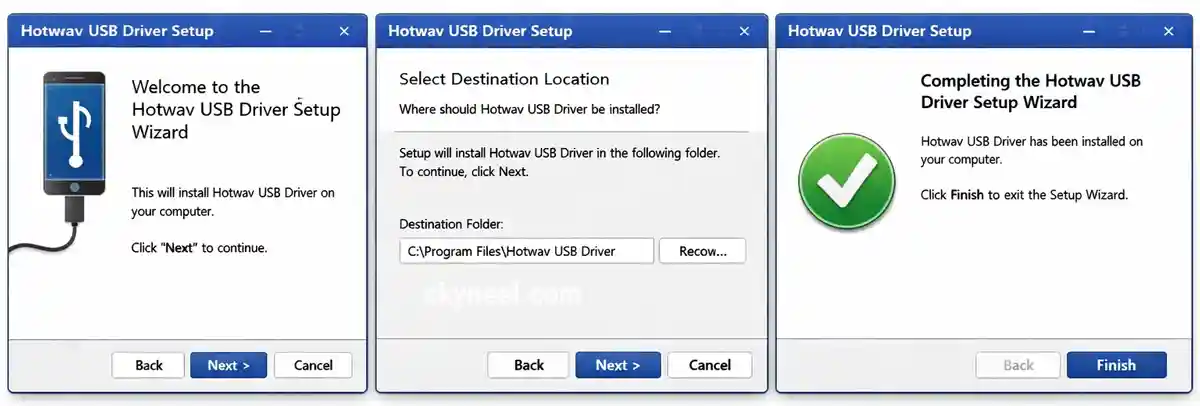
This is the fastest option for most people. It’s also beginner-friendly.
- Download the driver package from the table above.
- Extract the ZIP file to your desktop.
- Connect your Hotwav phone to your PC using a USB cable.
- Double-click the .exe file inside the extracted folder.
- Click Next, then Next again, then Finish.
- Restart your PC if Windows asks you to.
That’s it. Because the installer handles everything automatically, you won’t need to touch Device Manager at all.
Method 2: Manually via Device Manager
If your phone doesn’t come with an EXE installer, use this method instead. It takes a little longer, but it’s just as reliable.
- Download and extract the driver ZIP file on your PC.
- Connect your Hotwav smartphone to your computer with a USB cable.
- Press the Windows key, right-click This PC, then select Manage.
- In the window that opens, click Device Manager.
- Look for your phone under “Other Devices.” It usually shows a yellow warning triangle.
- Right-click the device name, then choose Update Driver Software.
- Select Browse my computer for driver software.
- Click Browse and select the folder where you extracted the driver files.
- Click Next to begin installation.
- Once finished, click Close. Your device should now appear correctly.
⚠️ Warning: Always download drivers from a trusted source. Third-party APK or EXE files from unknown sites can carry malware.
For more advanced setups, Google’s official Android developer guide (Google’s official Android developer guide) walks through enabling USB debugging for development work too.
🔍 Troubleshooting Common Issues
Still having trouble after installation? Here are the most common fixes.
1. PC Still Shows “Unknown Device”
Unplug your phone, restart your computer, then reconnect it. Also, try a different USB port — preferably one directly on the motherboard, not a front-panel hub.
2. Driver Installs But Phone Doesn’t Show Files
On your phone, swipe down the notification bar and tap the USB option. Then, switch it from “Charging Only” to “File Transfer (MTP).”
3. Windows Blocks the Installation
This happens because of Windows’ driver signature enforcement. So, disable it temporarily through Advanced Startup settings, then try installing again.
4. Phone Connects but Disconnects Randomly
Try a different USB cable first. Because cheap or damaged cables are the most common cause of random disconnects, this simple swap fixes the issue most of the time.
✅ Must Read: How to use WhatsApp in Hindi (Support Indian Language)
📌 Also Read: How to make video of power point presentation
ℹ️ FAQ
What is Hotwav USB Driver and why do I need it?
It’s the software bridge that lets your Windows PC recognize your Hotwav phone. Without it, file transfers, ROM flashing, and rooting simply won’t work.
How do I download Hotwav USB Driver for my specific model?
Scroll to the table above, find your exact model name, then click the Download button next to it. The universal driver also works for most devices.
Can I use the same USB driver for all Hotwav phones?
Yes, in most cases. Hotwav phones share the same chipset driver architecture, so one universal package usually covers every model.
What is the difference between Hotwav USB Driver and ADB Driver?
The USB driver handles basic file transfer and charging. The ADB driver, however, is needed for advanced tasks like rooting, flashing, or app debugging.
My PC is not detecting my Hotwav phone — how do I fix it?
First, reinstall the driver using Method 2 above. Then, check that USB debugging is enabled in your phone’s Developer Options settings.
🏆 Conclusion
Getting your Hotwav phone connected to your PC doesn’t have to be complicated. With the right Hotwav USB Driver, you can transfer files, flash firmware, and troubleshoot your device in just a few clicks.
✅ Key Takeaway: Download the correct driver for your model, choose either the EXE or manual installation method, and always source your files from a trusted site.
- Every current and legacy Hotwav model is covered in the table above
- Both installation methods work on Windows 7 through Windows 11
- Most connection issues are fixed with a cable swap or driver reinstall
- ADB drivers are only needed for rooting, flashing, or development work
Got a Hotwav model that’s still giving you trouble? Drop a comment below and we’ll help you sort it out. And if this guide saved you a headache, share it with a friend who needs it too! 📱
I want ip8 USB driver
Hi Shan download your driver.
I WANT HOTWAV V17 USB DRIVER