Hi, Huawei launched Nougat Stock Rom for Huawei Honor 6X B345. This is a Nougat Stock Rom for Huawei Honor 6X B345 Asian variant and here is an easy and safe tutorial for install Huawei Honor 6X B345 Nougat Firmware.
Huawei Honor 6X has Brilliant 5.5 inch LTPS IPS LCD screen with 1080 x 1920 pixels resolution. This phone comes with superb build quality and innovative design. Huawei Honor 6X has two outstanding features HiSilicon Kirin 655 and 3340mAh long Lasting Battery, it’s make this phone very smoother and faster.
Details of official Android Nougat Huawei Honor 6X B345:
This is a Huawei Honor 6X B345 Stock Rom and it is base on Android 7.0 Nougat.
- Device:– Huawei Honor 6X.
- Android Version:- Android 7.0 Nougat.
- UI Version:- Emotion UI 5.0.
- Model:- BLN-L22.
- Build Number:– BLN-L22C636B345
- Status:- Official.
- Firmware:– B345.
- Size:– 1.6 GB.
Download Rom and tools of Huawei Honor 6X B345:
| File Name | Download link |
|---|---|
| Huawei Honor 6X B345 Nougat Update.zip | Download |
| Huawei Honor 6X B345 Nougat update_data_full_BLN-L22_hw_spcseas.zip | Download |
| Huawei Honor 6X B345 USB Driver | Download |
Preparation of install Huawei Honor 6X B345 Nougat Firmware:
1. Take a backup of your phone Click here.
2. Your phone battery should charge 80% minimum.
3. Read all steps then do it careful.
How to update or install Huawei Honor 6X Nougat Stock Rom:
Here is a 2 Steps to Install Nougat Huawei Honor 6X B345 stock rom.
Step 1
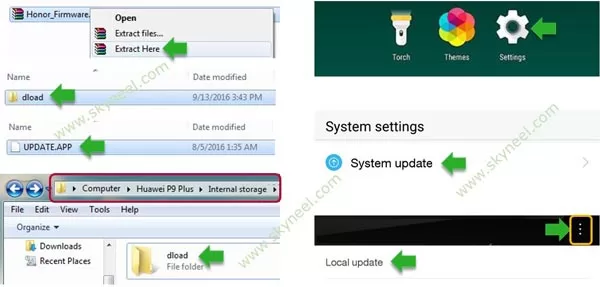
1: First, Download Nougat Update zip file and extract it. Now open extracted folder and you can see dload folder. In this dload folder, you find UPDATE.APP file.
2: Connect your phone to PC and copy the dload folder into your Phone Internal Storage. Do not copy dload folder into any folder or SD card!!
3: Go to the phone Dialer then Dial *#*#2846579#*#*, here you can open Hidden setting menu, tap on it. Now tap on the “Project Menu” tab and tap on the “Software Upgrade” and click on “SDCard Upgrade”. See in this image.
4: Now your phone is going to reboot in recovery mode and Rom flashing process start. Don’t interrupt this process, it might to take 4-6 minutes for your phone to boot.
- How to get lost Smartphone IMEI Number by Google
- How to recover lost contact list from Gmail on Android phone
Step 2
1: Now, Download update_full_PRA-L21HN_hw_meafnaf.zip file and extract it. Now Delete Old UPDATE.APP file and replace the UPDATE.APP file from above in that folder..
2: Connect your phone to PC and copy the dload folder into your Phone Internal Storage. Do not copy dload folder into any folder or SD card!!
3: Go to the phone Dialer then Dial *#*#2846579#*#*, here you can open Hidden setting menu, tap on it. Now tap on the “Project Menu” tab and tap on the “Software Upgrade” and click on “SDCard Upgrade”. See in this image.
✅ Must Read: Solution of Printer spooler service problem in Windows xp, 7, 8 and 10
📌 Also Read: Move chrome browser address bar at the bottom of Android phone screen
4: Now your phone is going to reboot in recovery mode and Rom flashing process start. Don’t interrupt this process, it might to take 4-6 minutes for your phone to boot on Nougat Rom.
Tips for New Update Nougat Huawei Honor 6X B345
After install Huawei Honor 6X B345 Nougat Firmware, you can root your phone because root allows you to use a maximum of your phone without any restrictions. After root you will install custom apps, Rom and custom setting in your phone. But first read Root Advantage and Disadvantage by this article then follow this guide to root Huawei Honor 6X B345.
I hope you like this New update Huawei Honor 6X B345 Nougat Firmware installation guide from which you will be able to easily install Huawei Honor 6X B345 Nougat Firmware without any extra efforts. If feel any problem in this guide then please use comment box. Thanks to all.