Hi, this is bug fix stable Rom for LeEco Le Max 2 . this is a New Marshmallow update LeEco Le Max 2 EUI 5.8.019S Stable Stock Rom and here is an easy and safe tutorial for install or New Marshmallow update LeEco Le Max 2 EUI 5.8.019S Stable Stock Rom.
LeEco Le Max 2 has Brilliant 5.7 inch screen with 1440 x 2560 pixels resolution. This phone comes with superb build quality and innovative design. LeEco Le Max 2 has two outstanding features Qualcomm MSM8996 Snapdragon 820 and Adreno 530 GPU with eUI 5.8, it’s make this phone very smoother and faster.
Must Read: How to unlock bootloader LeTV LeEco Le Max 2
Details of EUI 5.5.019S of LeEco Le Max 2:
You can fix some issue by this update LeEco Le Max 2 EUI 5.8.019S Stable Stock Rom. This is an Android 6.0 Marshmallow update, it is a marshmallow update with some fixes.
- Enabled VoLTE feature.
- Fixed an issue in which call drop happens when making VoLTE calls using Reliance JIO 4G network and Fixed an issue in which Reliance JIO Sim can not register IMS.
- Enhanced the auto night mode camera.
- Fixed an issue in which fingerprint unlock fails after few captures with camera from locker screen.
- Fixed an issue in which fingerprint unlock fails after few captures with camera from locker screen, Optimized color spot under HRD mode and Optimized QR Scanner focus speed.
- Added an access to app lock and privacy lock and Added Harassment Filter Function
Download Rom and tools of Le Max 2:
| File Name | Download link |
|---|---|
| LeEco Le Max 2 EUI 5.8.019S Stable Stock Rom | Download |
| LeEco Le Max 2 USB Driver | Download |
Preparation of New Marshmallow update Le Max 2 EUI 5.8.019S Stable Stock Rom:
1. Take a backup of your phone Click here.
2. Your phone battery should charge 80% minimum.
3. Read all steps then do it careful.
Must Read: Customize quick settings of System UI Tuner in Android 6 Marshmallow
How to install or New Marshmallow update LeEco Le Max 2 EUI 5.8.019S Stable Stock Rom:
Step 1: Download LeEco Le Max 2 EUI 5.8.019S file and rename this zip file as “update.zip” like LE_X2_X820-OS-OP-FGXOSOP5801910121S-5.8.019S.zip to New Marshmallow update.zip.
Step 2: Connect your phone to PC via USB Type-C and copy the zip file into your Phone Internal Storage. Do not copy the zip file into any folder!
Step 3: Go to “System update App” from the system tool, tap on the setting icon, it is a 3 dots icon on top right corner (see in this image) and tap on the “Local update” tab. Now you can see a message on your phone Screen, ” update package found, your phone will restart, are you sure to continue?”. See in this image.
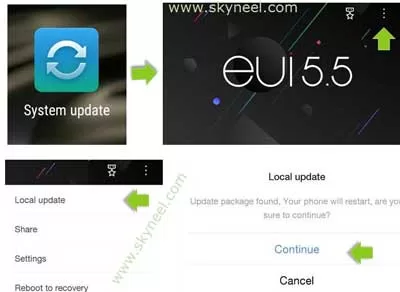
Step 4: Now Click on continue, your phone is going to reboot in recovery mode and Rom flashing process start. Don’t interrupt this process, it might to take 4-6 minutes for your phone to first boot on EUI 5.8.019S.
📌 Also Read: How to Send Feedback on Google Chrome against Google Search
💡 You might like: Latest Facebook Multilingual Composer lets you post in several languages
Must Read: How to Enable and Disable System UI Tuner in Android 6 Marshmallow
Tips for LeEco Le Max 2
After New Marshmallow update Le Max 2 EUI 5.8.019S Stable Stock Rom, you can root your phone because root allows you to use a maximum of your phone without any restrictions. After root you will install custom apps, Rom and custom setting in your phone. But first read Root Advantage and Disadvantage by this article then follow this guide to root LeEco Le Max 2.
I hope you like this New Marshmallow update Le Max 2 EUI 5.8.019S Stable Stock Rom installation guide from which you will be able to easily install or New Marshmallow update LeEco Le Max 2 EUI 5.8.019S Stable Stock Rom without any extra efforts. If feel any problem in this guide then please use comment box. Thanks to all.
WHAT IS THE LATEEST UPDATE TO LE MAX 2 ,PLS PROVIDE LINK TO THAT AND METHOD TO UPDATE , PHONE IS WORKING FINE AFTER INSTALLATION OF UPDATE PROVIDED HERE , THANKS A LOT
Hd option not show above
After updating stock
Volte option show in setting
No hd option enable in 5.8.19s with this time
My set model s x821
But show volte option in setting
Help for solutions
this link was not working
please provide another
Hi Now this is working.
same problem here.. #AKASH GANATRA
Please suggest official link for 5.8.019s for Le max 2 update
Please solved problum jio volt calls dropped please solve leco leemax 2 phone
Sir,
As link is not working please upload the (India) stock rom eui 5.8.019S for Letv Le Max 2.
This link isn’t working . Please provide latest official update link for leeco max 2 eui 5.8.19s
Hello Rahul,
In this post stock rom link is given of official letv forum. May be this forum is not working or they removed this link from it. Soon I will upload stock rom and provide it you .
Thanks for writing here.
sir,
link doesn’t work
please provide another link which is working
soon as possible
Hello Sachin,
In this post stock rom link is given of official letv forum. May be this forum is not working or they removed this link from it. Soon I will upload stock rom and provide it you .
Thanks for writing here.
No link on the web works for 5.8.019s (india). Plz help
Hello Deltasata,
In this post stock rom link is given of official letv forum. May be this forum is not working or they removed this link from it. Soon I will upload stock rom and provide it you.
Thanks for writing here.
Please give new update link. My phone has 5.6.013s and it donent have any uptate in the updater app. I am unable to use calling . Your help will be grate. Thanks in advance.
Link is not working. Plz fix
hi VK,
Thanks for inform us , now its working , you can download. thanks
still not working
Hello VK,
In this post stock rom link is given of official letv forum. May be this forum is not working or they removed this link from it. Soon I will upload stock rom and provide it you .
Thanks for writing here.
I thought of returning the phone back to Flipkart because It was shipped with 15s and I couldn’t use Jio SIM. Thanks to your article, I downloaded and tried updating the 19s stock ROM. Bit it failed. I had an instinct that I should have first updated to 16s stock ROM. I did it and it worked. Then I tried updating 19s stock ROM. It worked and I am able to use Jio SIM. Thank you once again.
Sir,
Can you pl. provide the links to download 16s stock rom & 19s stock rom
Hello Yagnesh,
In this post stock rom link is given of official letv forum. May be this forum is not working or they removed this link from it. Soon I will upload stock rom and provide it you .
Thanks for writing here.
hii bro im Arfath., i also purchased le max 2 from flipkart recently, shipped with 5.8.015s.
i have a doubt after updating to 16s can we directly update to 19s which is showing in system update or again we should download the 19s through link???
plzzzzz help me bro waiting for ur reply eagerly…..
I’m not able to update my EUI to 5.8.019d and it is still running on the old EUI 5.8.015s and it always flashes me a new update
After following all the steps and when it enters the recovery mode it always shows that either your installation has failed or APK file not found Please guide me the process to fix this problem on my Phone on Le Max 2
System update ke liye kya karna hoga