SUT L3 Tool is an application that allows you flash stock firmware on Intel chipset based any Android Devices. It is a powerful tool for all Intel chipset based Android devices, but you can use this tool when your phone USB driver is installed on your PC.
What is a SUT L3 Tool ?
SUT L3 Tools is an application to make bridge or connection between Android Smartphone and PC. And by this connection, you can easily flash Android Stock ROM on your intel chipset based android Smartphone and tablets.
Must Read: How to quickly select your Default Apps in Android 6 Marshmallow
Features of SUT L3 Toolkit:
1. Flash stock Rom installer: You can flash Stock on your Intel chipset based Android devices and most important unbrick your Android device by using SUT L3 Toolkit.
2. Simple Interface: This tools comes with very simple and easy interface. This tool allows you to safely and easily load stock ROM in the tool and quickly flash it on your device.
3. Inbuilt Drivers: This tool install all required USB drivers automatically on the your PC/Laptop with SUT L3 Tool. if you want to uninstall this tool from your PC/Laptop then drivers will be not uninstall automatically.
Download latest SUT L3 Tool:
| SUT L3 V1.7.2 | Download |
|---|---|
| SUT L3 V2.1.1 | Download |
| SUT L3 V3.1.4 | Download |
| SUT L3 V3.1.8 | Download |
Must Read: Setup SD Card as Internal Storage on Android without Root
How to use SUT L3 Tool on your PC or Laptop:
Step 1: Download and install your phone USB driver on your PC. Now download SUT L3 Tool and Stock firmware and extract both zip or rar file on desktop in a folder. Enable Developer Mode and USB debugging mode on your Smartphone by this guide.
Step 2: install SUT L3 toolkit on your PC or Laptop and power off your Android Devices.
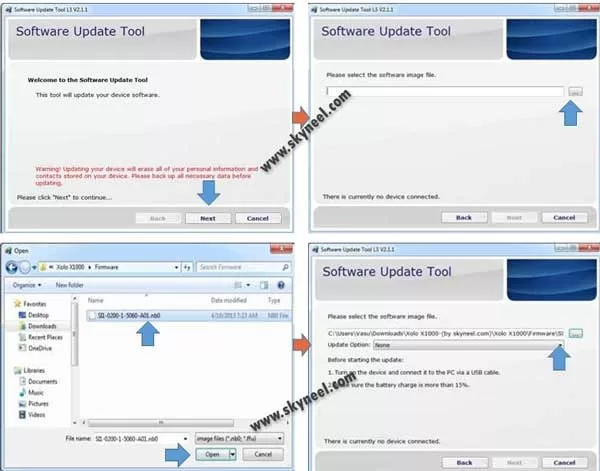
Step 3: Open SUT L3 toolkit and click on Next button. Then click on browse button and select firmware from firmware folder.
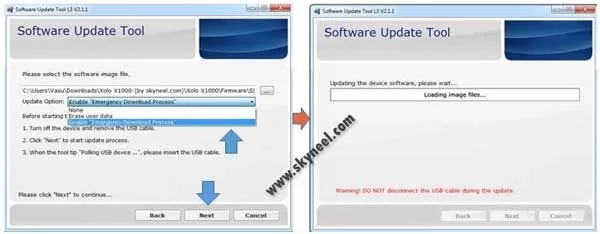
Step 4: When you have successfully added the stock rom in the SUT L3 Tool, select Enable Emergency Download Process from the update option.
💡 You might like: Reliance Jio Internet or WiFi Speed Notification Bar on Android Phone
👉 Don't miss: How to use the Excel AVERAGEIF function
Step 5: Now connect your android device to your PC or Laptop and click on Next Button to start flashing process. after 5-10 minutes flashing process is completed, now you will see Green Pass status.
Must Read: Download Android smart switch application
I hope you get your desirable SUT L3 Tool version. You can easily install it and flash your ROM and custom recovery. If feel any problem in this guide then please use comment box. Thanks to all.