Hi, In this guide you will find how to enable developer options and debugging on Android 4.2 or upper of Android OS. This is a very simple, safe and easy step by step guide tutorial for enable developer options and debugging on Android 4.2 or upper version with image guide.
Developer options not enable by default on Android 4.2 or upper of Android OS. You need to enable Developer options for the enable debugging mode and protect your SD card etc features. If you want to update your ROM and root your device then you must be enable debugging mode for safe side.
After enable debugging mode, if your Android device is damage while updating or rooting process then you and your device manufacturer company service able repair your Android device. So here we go to know How to Enable developer options in Android 4.2 or upper version.
Must Read: How to install custom fonts in Android phones
How to enable developer options and debugging on Android device:
Step 1: First of all open App menu on your Android device then go to the System setting. Now scroll down at the bottom and tap on the About phone tab, then scroll down and find Build number tab. Now tap on Build number tab 5-10 times continue, then you will get a popup massage “You have enabled development setting”. Now you have enabled Developer option tab on your Android device. See in this image.
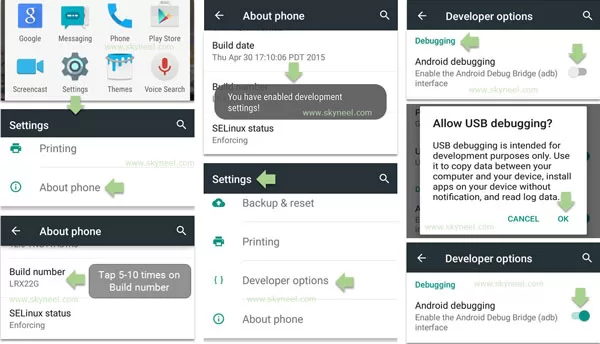
Step 2: Now go back to the System setting and scroll down to find Developer options tab, when you find Developer options then tap on the Developer options to open it. Now find Debugging section and enable Android debugging or USB debugging. You will get a popup message, then tap on the OK. Now you will Android debugging enabled. See in this image.
📌 Also Read: Oppo R15 Pro launched With 3,430mAh Battery
💡 You might like: How to insert Excel Pivot Table Calculated Field or Calculated Item
Must Read: How to fix overheating problem of Smartphone
I hope you like this update guide from which you will be able to easily enable developer options and debugging on Android 4.2 or upper version without any extra efforts. If you feel any kind of problem in this guide then please use comment box. Kindly, follow all these given steps carefully and share your knowledge with your friends, colleague, family members and others. Thanks to all.
I have the original credentials but after the Hard reset Samsung SM-T580 will nit get past FRP lock!
When I enter the original credentials it says unauthorzed reset & a message about waiting 24 hours
what can I do? USA
In my Vivo Y28 the Build Number is not there. What should I do?
hello Mamta
i have a vivo y28 phone too
now to open developer option Go To> settings>more settings>about phone>version than tab software version 5-6 times and
now u r a Developer.
My lyf wind 5 is not rooted plz help
how can i root my vivo v51l..can any one give me any idea..plz help me..rply me olz
sir i have micromax unite 3 smartphone ,i want to update my phone ,how is this possible i have no idea .
give me some tricks .
What is the benifit of usb debugging.
I hav micromax a200..
My phn problem is starting sturcked it shows micromax canvas turbomini symbol strucked..
It can’t opened..
Pls give me solution..
Sir i have Micromax a110 how can i conect usb drive through otg
Please help sir
Hi Nitin
Micromax A110 Cavas 2 support OTG by Jelly Bean Stock Rom and you can use USB drive on your phone by OTG cabble.
Hello am usin samsung j7. I successful enabled the devoloper option but my usb debuggin was not highlighted. I couldnt turn it on. Plz help
Hi
If you are using My Knox, you cannot enable USB debugging mode while the container is installed.
Thanks to help me… Your advice is very helpful to me its working…
My phone has not option of android debugging
hi Ansh
First of all enable developer option then you can find USB debugging in the developer option.
I have Samsung galaxy Alpha G850k
i want to convert to international and i have downloaded G850F Firmware
i tried to flash by ODIN but fail…. How can i success plz
thank you
Hi
Don’t try it, because baseband are changed.
I’ve tried on my Micromax canvas 5 but i can’t find Android debugging
If you do these steps on right way then you can find usb debugging option under developer option in the system setting.
Theres not even build number just device name im lost
Hi John
open your phone setting and tap on About phone tab, look for Build number tab and tap on it 5-10 times.
sir i had tried on micromax canvas 2+ but i can’t find the option of android debugging. what can i do?
Really useful. But: how to disable developer options on SM-A300M? I would like to supress it from Config menu. Thanks in advance.
Why not showing Android debugging options
Hi
I m irfan Shaikh .
I have micromax aq5001 .
So not showing Android debugging in my phone so what should I do..?
hi irfan
First of all open App menu on your Android device then go to the System setting >>> Now scroll down at the bottom, Here you can see About phone tab. Tap on the About phone tab >>> Scroll down and find Build number tab >>> Now tap on Build number tab 5-10 times continue >>> Now you will get a popup massage “You have enabled development setting”. Now you have enabled Developer option tab on your Android device. read this post click here
Sir in my gionee p4 i clicked 7 times or more but it always shows no need, you already a developer but in my developer option i found only one option usb dedubing only what i do for other developer options. Plzzzz help me sir Plzzz
after clicking build no it appears no need you are already a developer
Hi
I have micomax canvas turbo A250 model ( jelly bean 4.2.1 os) i unable to upgrade the os in phone so kindly help
Hi
Here is guide: How to update Micromax A250 Turbo with New Stock Rom V5
Sir, I tried king root, towelroot and farmaroot also (I enabled USB debugging and those stuffs also) … But every tool is showing that “root access is unavailable for this model/Micromax bolt Q338”
So how will I root my Q338… Plz suggest me
hello anjuman
you root your micromax Q338 using this method click here
i accedently removed developer options how can i get it back
i installed kingroot but its not working properly tell how i root my phne with ths
Hello Garry
Which phone do you use?
Tell me i help you
hii sir
How to root my micromax bolt q335 ??
Pls help me sir….its urgent..
Hello Cathy ,
You just root your device with help of this article How to root Micromax Bolt Q335 without PC
the debugging first step is with image it ok, next step their no image .plz add it. thanku
i have mmx unite 2 – A106 mobile. i have deleted my stock android system recovery , so there is no recovery, is there any recovery for my cell ??!!
hi imran ,
You just flash a stock rom click here
How to update My Micromax Nitro 2 E311 to Lollipop?
Is update available for my Micromax Nitro 2 E311?
hi mahesh
Micromax E311 Canvas Nitro 2 no lollipop update is available
android debugging was not showing to me please help to.me
Hi
Enable developer option then open it and scroll, you will find USB debugging on it.
it is in the about phone last option kennel options then press 4 time .come back to setting u will vet the developer options
it in build option
pleas update my Micromax canvas juice a77 lollipop pleAs
Micromax did not release Lollipop for Micromax canvas juice a77. If it will release then you will find lollipop Rom with guide here.
i’ve micromax canvas knight cameo a290. i unroot my device. and now i want to upgrade 4.4.2 to 5.0 . so, what should i do? please help me.
HI Kaushik
Micromax did not release Lollipop for micromax canvas knight cameo a290. If it will release then you will find lollipop Rom with guide here.
how i install custom rom in my micromax a111. plz help …
hi
I don’t suggest you any custom Rom because custom Rom means, Beginning of troubles in your phone.
You are amazing man. Keep it up. Solved a big problem of mine. Had searched everywhere, being a novice. Thanks a lot.
How to root my vivo y28
Hi
Here is guide to root my vivo y28: Click here
Hi my mobile micromax canvas 6 e485,, I have followed all instructions of u and successful of 60%root then it will showing your device not rooted,,,,,,, can you please inform me reason
sir mera handset a110 pc ko connect nahi hora plz give
Hi
Install Vcom driver : How to install Vcom driver in Micromax, cynus and any MTK device
hi. maine apna micromax a106 ko update kiya h uke bad se mobile mai dono hi sim k signel nhi aa rhe h.. aur mai koi call bhi nhi kr pa rhe hu but wo sim detected kr rha h what to do…???
Hi Madhu
check your IMEI number!!
Hii sir
muje canvas a88 ka rom Chenge krna he so please help mi sir ….
Hi
Here is guide : New update of Micromax A88 Canvas Music Stock Rom V3
thanks …
thnx
Plz reply sir..
A177 maine jo apne step di thi vaise mobile root kiya tha..uske baad,
Re-partition apk. Download> install >open kiya fir waha pe
option aaye
1. 500 MB
2. 2.5 GB
3. 3 GB
Maine 3 option choose kiya mobile recovary mode me aaya. Uske baad battery remove kiya to ..boot animation nahi aaraha ..sirf micromax ka logo aata he. Plz help me sir
Sir plz help kro mera canvas juice break ho gaya
Hi
A77 or A177?
really genius u are
THANKS
Welcome,
Join us on Facebook for our new update and posts