Hi, this is a safe and easy step by step tutorial to install TWRP 2.5.0.0 and CWM 6.0.3.2 Recovery on Micromax A110 Canvas 2, but i like TWRP recovery. It is more user friendly and easy to use. In this process, we need a rooted phone and Mobileuncle tool. Mobileuncle tool is a free app on Google play store. So you can install this app from Google play store.
Preparation:
1. Your phone battery should charge 80% minimum.
2. Read all steps then do it careful.
Download TWRP 2.5.0.0 and CWM 6.0.3.2 Recovery for Micromax A110:
1. TWRP 2.5.0.0 Recovery: Click here to Download
2. CWM 6.0.3.2 Recovery: Click here to Download
Must Read: How to install custom fonts in Android phones
How to root and install CWM or TWRP recovery in Micromax A110:
Step 1: First root your phone, here is root guide for Micromax A110 Click here
Step 2: Download CWM Recovery
Step 3: Copy CWM recovery file on your SD Card and file must be recovery.img. If it has different name then rename it.
Step 4: Download and install MobileUncle Tools app on your Phone.
Step 5: Tap on the Mobile Uncle Tools app >>> After then you will get a pop-up tab for Permission >>> Tap on the Grant for SU app permission >>> Now Tap on the Recovery Update option.
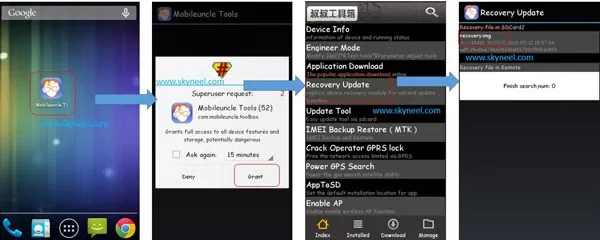
Step 6: Now Tap on the Apply option. After then you will get two option reboot your Device or go to recovery mode. Choose as your requirement.
💡 You might like: 2 Ways to Fill blank cells with 0 or any specific value in Excel
👉 Don't miss: How to solve hanging problem in Android phone
Must Read: Latest Google play store for any Android device and Micromax A110
I hope you like this custom recovery guide from which you will be able to easily install TWRP 2.5.0.0 and CWM 6.0.3.2 Recovery in Micromax A110 without any extra efforts. If feel any problem in this guide then please use comment box. Thanks to all.
Thanks and Credit: varun.chitre15 for recovery and Mobileuncle tool
Thanks for finally writing about > TWRP 2.5.0.0 and CWM 6.0.3.2
Recovery for Micromax A110
I am not getting cwm or twrp recovery for my mmx aq5000.. Please reply me through my email… If anyone finds it..
hi sir mmx a110 toch not work many toch chenge but problem not solve how to solve
Hi Kamal
Try to flash your Stock Rom, here is guide: Install new update of Micromax A110 Canvas 2 Jelly Bean V4 1.11
dipak ji मेरा मोबाइल micromax a177 है
मै अपने मोबाइल को recovery mod में volume+ power button से ले जाता हूँ पर वो android version recovery mod में जाता है जबकि मुझे CWM BASED RECOVERY MOD में अपने मोबाइल को ले जाना है जिससे में kitkat for a177 या miui v5 rom for micromax a177 ko install kr sakun
जब आप लोग फोन को volume+ & power button दबाकर recovery mod में ले जाते हो तो rom manager का symbol का चित्र या water mark का चित्र एक काली टोपी के निचे चक्र बना होता है और ऊपर screen पर reboot system आदि सभी ऑप्शन्स होते है।
miui.zip तो install हो जायेगी पर उससे पहले क्रपया हमे इस टोपी वाले mod मतलव cwm based recovery mod में जाने के लिये क्या install करे हम mobile uncle app से अपने mobile की recovery.img भी flash क्र चुके है
तब भी android version mod आ रहा है पर टोपी वाला mod नही आ रहा है और न ही cwm based recovery लिख कर आ रहा है क्रपया video भेजे और जो app install करना है उसे बताये link लिखे। मै root master तथा framroot app दोनों से mobile root कर के देख चूका हूँ और supersu.apk से mobile full unroot भी कर चूका हूँ
मेरे लिये सबसे बड़ी प्रॉब्लम तो टोपी वाले चित्र वाले mod में mobile को कैसे लाऊं क्रपया हेल्प करे भाई ज़ी
मेरा email है kdeep.singh08@gmail.com इस पर लिंक करें video और ब्लॉग soluton लिंक कर भेज दें
तो मै आपका बहुत आभारी रहूंगा।
For cwm recovery you need to download adb driver and connect your phone via USB cable .then download droid tool kit, it will automatically detect your phone .if you see green check box then go to “recovery, backup” tab and click on recovery on phone…and wait to complete the process .
Now you will get the cwm recovery on your phone .
sir my touch is not working on TWRP
Hi sir
How to remove cwm recovery and restore old recovery pls help
Abhishek
It is work in touch panel
HI ABHISHEK
PLZ HELP ME I HAD INSTALLED CWM RECOVERY 2 MONTHS AGO BUT NOW I AM NOT ABLE TO BOOT IT WHEN I BOOT CWM RECOVERY MY PHONE RESTORES
re-flash Custom recovery via Sptool
Hello Abhieshek,
which one is better recovery option as i m using CWM recovery since long. want to try TWRP recovery. what is u r suggestion.
Hi Santosh
i am using TWRP recovery, it is best
Hye dude after replacing recovery.img …. if I opened da twrp its opening but screen touch s not working …. how to install superuser ….. means now how to root my canvas 2
use + and – button to up and down
home key to enter
hi Abhishek, i tried alot but its not working. after clicking download button n connecting phone to pc some error comes dere.
I would like to show what error comes dere….i have taken pic of dat error by snipping tool…but how to show u dat???? can u plz help me out…dat would be so kind of u…thanx..
watch this video it will help you click here
first of all uninstall all drivers
now install this(in the link) and connect your phone to the computer(phone is to be in switched on mode) then drivers will be installed
now follow the procedure as mention in this thread
http://www.4shared.com/file/rDlcDENX/PdaNetA4126.htm
i was tray this process but same problem.
My devices is A110 My processor is MI6577.
i was replace recovery file in this Folder [S9081_MP_F4.1_B1_IN_MMX_1.11]. then i was download this file in my devices through SP TOOLS after all the process i start my devices Vol. Up & Down + power button. then i will press Vol+ button. then my devices is restart for factory reset.
but i was replace only recovery file.nothing any other file.
hello please reply me.
try mobile uncle app for recovery update
hi MEHUL
if you have problem update recovery with mobile uncle app then use flashing steps
Second option work in root or unroot phone
1. Download MT6589_Android_scatter_ emmc.text file and TWRP/CWM recovery.img. Copy both file in a folder
2. Extract and open the SP Flash Tools folder. Then right click on sptool.exe, select run as administrator after that Click on Scatter-Loading option and Browse select the file"MT6589_Android_scatter_ emmc.text file"
3. Uncheck all file, Check only recovery.img
4. Switch off your phone and Clicks the Download option then connect your phone to PC.
Note:-Don't interrupt this process as it can potentially brick your device.
5. After the process completes, a green ring will appear.
6. Now disconnect your phone.
7. Do not start your phone. Press and hold Vol. Up & Down + power button then select “recovery mode”
Enjoy
Hi Deepak
Read this post and Follow all steps click here
But first of all you will install vcom Driver than do it. Here is a video of how to install vcom driver in your PC.
Hey buddy i have tried almost everything out to root my Canvas A110 but its not working , i tried the above steps and when i click download nothing is happening . Hope you could be my saviour
P.S – Iam using Canvas A110 with Jelly Bean OS
hey Abhishek bro am using karbonn 10 but there is no clockwork mod recovery for it plss suggest something
Hi Shubham
if i find then definitely i will share for you.
Hello i have to install ClockWorkMod 6.0.3.2 Recovery in my micromax A110 using Mobile Uncle Tools after completed my all process then i was starting my device to Press volume Up & down key and power on off key.
then after i was press volume up key (Recover mode) its cant open CWM menu.
my devise is restart for factory reset.