Hi, this is first update LeTV Le 1s EUI 5.5.014S Stable Stock Rom and here is an easy and safe tutorial for install or update LeEco Le 1s EUI 5.5.014S Stable Stock Rom.
Details of EUI 5.5.014S of LeEco Le 1s:
You can fix some issue by this update LeTV Le 1s EUI 5.5.014S Stable Stock Rom. This is not Android 6.1 Marshmallow update, it is same Lollipop update with some fixes. Here is the fixes details:
- Fixed Camera force to close under certain condition and updated camera temperature warning from 50 to 45 degree.
- Added LeLive, Added LeEco membership and fixed calender issue.
- Fixed Map and browser force to close issue.
- fixed video playback interrupted after unlock screen.
- System Power optimization and fixed typos for certain modules.
- Tie up with Yupp TV and now you can access to over 100 premium TV channels for sport, movies, music and many more.
Download Rom and tools of LeEco Le 1s:
| File Name | Download link |
|---|---|
| LeEco Le 1s EUI 5.5.014S Stable Stock Rom | Download |
| LeEco Le 1s USB Driver | Download |
Preparation of update:
1. Take a backup of your phone Click here.
2. Your phone battery should charge 80% minimum.
3. Read all steps then do it careful.
Must Read: Common security mistakes done by Android phone users
How to install or update LeTV Le 1s EUI 5.5.014S Stable Stock Rom:
Step 1: Download LeEco Le 1s EUI 5.5.014S file and rename this zip file as “update.zip” like S1_x500-OS-OP-DHXOSOP5501405251S-5.5.014S to update.zip.
Step 2: Connect your phone to PC via USB Type-C and copy the zip file into your Phone Internal Storage. Do not copy the zip file into any folder!
Step 3: Go to “System Update App” from the system tool, tap on the setting icon, it is a 3 dots icon on top right corner (see in this image) and tap on the “Local Update” tab. Now you can see a message on your phone Screen, “Update package found, your phone will restart, are you sure to continue?”. See in this image.
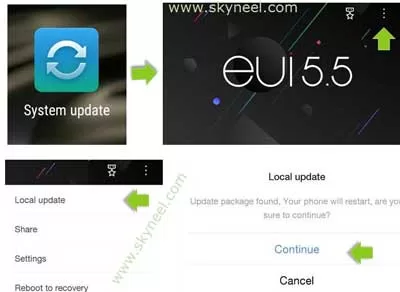
Step 4: Now Click on continue, your phone is going to reboot in recovery mode and Rom flashing process start. Don’t interrupt this process, it might to take 4-6 minutes for your phone to first boot on eui 5.5.014S.
Must Read: How to take professional photography with Android phone
📌 Also Read: Excel Fact Function - Return Factorial of Number
💡 You might like: How to Return Multiple Items with VLookup in Excel
After update LeTV Le 1s EUI 5.5.014S Stable Stock Rom, you can root your phone because root allows you to use a maximum of your phone without any restrictions. After root you will install custom apps, Rom and custom setting in your phone. But first read Root Advantage and Disadvantage by this article, then here is a root guide: How to root LeTV LeEco Le 1s without PC.
I hope you like this update LeTV Le 1s EUI 5.5.014S Stable Stock Rom installation guide from which you will be able to easily install or update LeTV Le 1s EUI 5.5.014S Stable Stock Rom without any extra efforts. If feel any problem in this guide then please use comment box. Thanks to all.
My virson is 5.5.014 s I want to update but does not update
Me too
How can i update my phone to 5.5.014s. It is running on 5.5.012s
Hi
Now you can update your Le 1s with this New update Marshmallow LeEco Le 1s EUI 5.8.019S Stable Stock Rom
Bro will it require twrp recovery
Hi neel mujko ye btao ki mera phn le eco 1 5.5 version p akdam thik chal raha tha phir abi kuch din pahle mere pass iska update version aaya …5.8 to mne isko 5.8 version m update kar liya…us din s m bhut parshan hu …..is 5.8 version m kuch b sahi s nhi chal raha h ….to ab m ye chahta hu ki mera phn phir s wo h 5.5 version m wapis ho jaye iska koi tarika h ki ye 5.8 version s 5.5 version m wapis chala jaye ..
my phone file manager menu open karne k baad application menu tuch kartahu to massage aata hai sorry but file manager has stopped report this issue now?
Hi nilesh,
you can reset and factory data on your Le 1s then you can flash marshmallow update and enjoy with marshmallow .
Plz say mi bro kya meraa data loss hoyegaa ky
hi kabir,
here is no data loss but i advice you if possible you back up your data.
First..kingroot remove..your phone…(2) after a download a 5.5.014s virosn zip file in pc (3)after its file name Chang and rename is “update. Zip(4)connect phone your PC and file send a internal storage not a any folder(5)after a local update in phone and a press continue… So update a virson…
How can I update my le 1s in marshmallow pls tell me frnds ??¿¿??
hi deepak,
you can update your le 1s using this guide
Hi my phone doesn’t restart after pressing continue. I have to restart it manually and it never update. Can you please help me.
hi saby,
you can install this update using sp tools. i personally used this method its working bro.
Guide
Kindly help me update above mentioned Rom in rooted leeco le 1s phone, as i tried as explained by u in rooted phone . Thanks
Hi
unroot your phone the try to update your phone.
Hi,
Kindly help me to know how to unroot Le eco Le 1s
Thanks
hi Neil
you can read and try this guide