We are facing lot of problems when anybody wants to type in the Hindi letters and special characters in our active document. This guide helps you to know how to do effortless hindi typing special character code.
To solve this kind of problem first you must need to load different Hindi fonts like DevLys fonts on your computer then start typing using given chart in Hindi.
Effortless Hindi Typing Special Character Code
Most of the person have to face lot of problems during learning the Effortless Hindi typing special character code. But there is no need to worry after reading this guide your problem will be solved. Now you can easily and quickly start effortless Hindi typing special character codes.
Remington Keyboard
A typical Hindi typing keyboard with the Hindi font DevLys and Kruti Dev. These Hindi keyboard is specially used in the govt. Hindi typing examination such as LDC in Rajasthan, Data Entry Operator in different state. Most of the novice user who don’t know about the Hindi typing start to type Hindi characters by using Hindi typing tutor with the Hindi keyboard. These Hindi keyboard helps you to easily clear Hindi typing test in any govt. job examination.
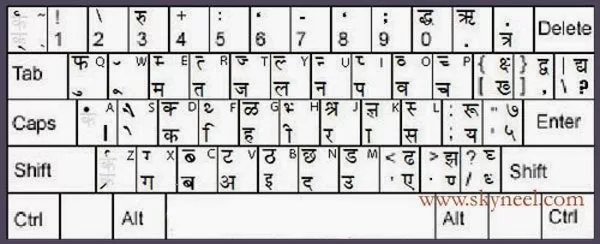
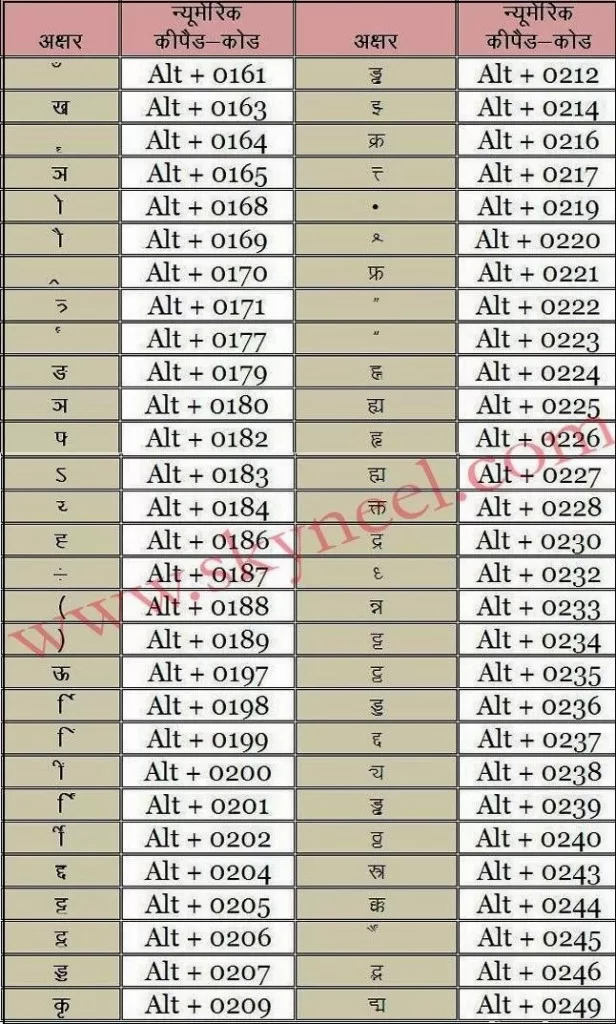
With the help of Remington keyboard layout you can easily and quickly start learning of Hindi typing. If you fell any problem during typing and character in Hindi and don’t know how to type these special characters then either you have to use Character Map in which you got lot of key combination which is used by ALT+0XXX keys. These XXX keys are used only from the Numeric Keypad. To run “Character Map” in your computer Press WIN+R key to open the run box then type “charmap” then press enter key. It displays Character Map dialog box, you can select any Hindi font to view special codes for special Hindi characters.
Must Read: Stay safe and secure by creating a secure password
I would like to told you that all kind of Hindi font like Devlys, Kruti Dev, Mangal and many more font are available for free download from the internet. You can easily download and install these fonts and different styles in your computer and start Effortless Hindi Typing without any extra effort.
Types of Hindi font
- Legacy Hindi Font
- Unicode Hindi Font
Legacy Fonts:
Legacy Hindi fonts are those that we can use normally for Hindi typing like Devlys, Mangal, Kruti Dev, Chankya and many more. If you want to check that these Hindi fonts are legacy or not then you have to double click on these fonts. All we know very well that hindi typing is very tough for learning but it is widely used in India. So, first download these Hindi fonts from the internet and then read this article carefully and start typing in the Hindi.
📌 Also Read: Quick way to unroot any rooted Android phone
💡 You might like: Increase sound and volume quality of Android Device
Must Read: All queries of math’s can be solved by Wolfram Alpha app
Unicode Hindi Font
You can use “Mangal” font in Hindi typing because it is a Unicode font. Lot of time when you are working online and watch Hindi characters on many websites these are Unicode fonts. You can easily check these these fonts are Unicode fonts or not by double clicking on these fonts. If you watch English characters then after double clicking then its prove that these are Unicode fonts. You have to use a special software with Mangal font, if you want to type in Hindi language.
I hope you like this Effortless Hindi Typing Special Character Code post. Give your important suggestion in the comment box and also share this article with your friends to show your knowledge in Hindi typing. Thanks.
ङ्ग कैसे टाईप होगा।
Dear sir, can u tell me the alt code of “half iyn(ञ्)” in kruti dev
Please suggest how to wright “Ghari” in hindi font kruti dev 10
Regard’s
Mukesh
Type keyboard key : /kjh for “Ghari”
????
श्च,श्व,द्भ ka code
Shreshth ka alt code key yh shortcut ky hoga sir jii
सर ह्र को KRUTIDEV FONT पर कैसे टाइप करुँ ? ह्रास
hyphen and presentage ka sign kruti dev me kaise type karte hai
hindi me art likhane ka tarika bataea
how to write shree first word in kruti dev 010 plz tell me
shift+j then H
How to write hyphen – in kruti dev 10?
हिन्दी मे रुपये का symbol के लिए कौन सा key है कृपया बताइये ?
Hi Sachin,
Thanks for writing us. First you have to download and install Hindi Indian Rupees Symbol Font at your system. If you want to how to do this job you just read given article…. How to download and install Hindi Indian Rupees Symbol Font: (https://skyneel.com/hindi-indian-rupees-symbol-font).
Keep in touch and if you have any issue then write us..
SIFT+;
Bda ” oo “”kse kru type?
Aap symbol me jakr shortcut key b assign kr skte h
shift+;: buttun
percent ke liy kurthidev 10 short key
dear sir/madam kruti dev me inverted commas (“) kese type honge
Hi Harish,
You can use given shortcut key Alt+0222 & Alt+0223 for double inverted commas. Thanks for writing, keep in touch.
सर कृतिदेव 10 में श्च एवं ङ्ग कैसे टाईप होगा।
devnagri font me kon kona se font aate h hindi ke
सर कृति देव में ग्र कैसे टाइप होगा???
sir how to write ड्रोन, माँ, () in kruti dev fonts
Dear sir, can u tell me the alt code of “half iyn(ञ्)” and alt code of “om” character in kruti dev 10?
parcent ka symbol kesi aaega plz bta do sir Vc80609@gmail
par dal de
Dear Vikas,
Use Alt+037 or You can also get help Onscreen Keyboard where you have to press Alt+Shift+Ctrl and choose % symbol.
% ka symbol us code se nhi aata hai
aur alt+shift+ctrl and % symbol choose karne se ye :aata ha
plz guide how write1/2 in kurtidev010 font
alt+0188=¼
alt+0189=½
You must select english font then use this shortcut key
remington gail all code character not type why please help
Percent ka sign kaise hota hi hindi typing me
Sir percentage ka symbol kese type ho ga
% persentage kritidev me konse code se ayga
koi batayega (मैं ,में)me uper ki matra ke lie kruti font 010 me code kya hai
or पढ़ाई me niche bindi ke kie code kya hai
कोई बताएगा – क्रुति फॉन्ट 010 मे -मैं लिखने के लिए ऊपर की मात्र केसे दी जाती है
ओर पढ़ाई मे नीचे की बिंदी केसे दी जाती है
मैं लखिने के लिए e के बाद shift+s दबाओ फिर a दबाओ
पढाई के लिए shift दबाकर+ दबाए
Tell me plz percentage sign in Kruti dev
please sabhi chapter code bheje
मंगल फोंट के इनिस्क्रिप्ट के सभी सेमबल का कोड़ बता दीजिए मेरे मेल आई डी पर । और कृपा कृति देव का मत भेजिएगा।
vipinkumarc333@gmail.com
Koi bataayega KrutiDev font me फ़ kese likhte he
sift+8
श्व kaise aayega krutidev mein? KESE HOGA
श्व kaise aayega krutidev mein?
thank you
Devlys 010 me रू kaise aayega plz baataye…
shift+; and agr bada RU likna hai to shift+3
Krutidev10 का सभी कोड भेजिये, जैसे % जा सिम्बल कैसे आएगा, पॉइंट का सिम्बोल ऐसे ही सभी कोड भेजने की कृपा करें…
koi batayega
ग्रह kaise likhenge. kyuki ‘xz’ se likhne se ग्र ban to jata hai lekin wo thik se nahi banta jaise hona chahiye.
Sir Please btaye ki Hyphen (-) likhne k liye kruti dev pr kaise likhenge, with Alt key or other ex. mata-pita, aaj-kal, dhire-dhire. etc. Dash nhi hai.
Shift+7
shift key with 7
shift and 7
sir सद् विचार कैसे लिखे
bhai koi mangal ke inskript ke sabhi prakar ke code janta ho to please send me
as: जैसे पढ़ाई के नीचे की बिन्दी दो प्रकार से लगती है। एक तो सिफ्त के साथ ञ से दूसरी कैसे लगती है कोई तो बताओंं क्योंकि कई बार सही लिखने पर भी गलत बताता है सोफ्टवेयर
कौन से साफट्वेयर पर गलत बताता है।
percentage ka symbol kaise banega hini typing me
please koi ye bataye ki kurti dev 010 font me ” pra ” likhne ke liye code ka use karna hai ki bina code se bhi ho jaega .. aur agar ho jaega to kya ye test me sahi mana jaega … please koi batae
प्र likhne ke lia code ka use karna hai ki bina iske bhi ho jaega
Alt + 0193 se “pra” ho jayega
भाई लोग क्या कोई बता सकता है के —- पड़ा —- मंगल फांट से कैसे लिखा जा सकता है?
प ड ़ ा कर के देखने में तो सही लग रहा परन्तु यह सही नहीे है।
ड़ लिखने का तरीका बताये कृपया….
पड़ा को मंगल फाॅन्ट में लिखने के लिये टाइप करें— h[ ]e कोष्ठक में स्पेस नहीं देना है।
Jitendra Singh Bareilly (up)
Sir Mujhe mangal font ke sabhi short key mere id par bhej dijiye
Can anybody help me to type vidyt in Hindin Inscript with Mangal font. विध्ुत कृप्या अपने विचार जरूर दे. धन्यावाद.
Sir plz…tell me the special cracter of unicode inscript keyboard….plz help me sir bcz my exm is going on only 3 days…exm..द्व हृदय
8292879444
just type
small letter = o
then
small letter = d
then
small letter = b
same for all …..
important keyword are SMALL LETTER d use
Sir mujhe Chandini front par typing test dena hai plz…help Hindi typing Unicode inscription pe hogi
Sir mujhe upp computer operator k a typing test r dena hai plz…help Hindi typing Unicode inscription pe hogi…ye kya hai kya ye mangal font hai?
N special character Kaise lagenge like (‘”? Ye sab plz help
yes mangal font alag hota hai but easy hota hai with practice….
mera b hai comp operator mai typing…
plz help me how to write special character in mangal font…..
Alt+0147 and Alt+0148
hello sir plz magal font key board ki image mail per bhj dijiyy.
मंगल फोंट के इनिस्क्रिप्ट के सभी सेमबल का कोड़ बता दीजिए मेरे मेल आई डी पर । और कृपा कृति देव का मत भेजिएगा।मंगल का कोड प्रश्नवाचक का कोड अल्ट के साथ 63दबाने पर आता है उसी तरह बाकी कोड भी जानना है।धन्यवाद!
sir नेतृत्व me तृ kaise type kare
` type kijiye
hello sir plz magal font key board ki image mail per bhj dijiyy.
मंगल फोंट के इनिस्क्रिप्ट के सभी सेमबल का कोड़ बता दीजिए मेरे मेल आई डी पर । और कृपा कृति देव का मत भेजिएगा।
मंगल का कोड प्रश्नवाचक का कोड अल्ट के साथ 63 दबाने पर आता है उसी तरह बाकी कोड भी जानना है।धन्यवाद!
From which key we type
प्रतिष्ठा
how type single and double quote(like ” ‘) in inscript hindi keyboard
Hi harvir,
Thanks for writing. During typing in hindi letter if you have to use Alt+0222, Alt+0223 for double coat and Shift+6 and Shift+8 for single coat
tell me how to type half letter (adha क,स,ब,…) in inscript hindi keyboard with mangal font
single quote by shift+8 and double quote by alt+0222 (opening inverted comma) and alt+0223 (closed inverted comma)
veri nic.
Thanks for writing… :-)