This is root tutorial of Huawei C8813. This method is easy and safe for your mobile. So root your phone and enjoy your phone without any restriction. Huawei C8813 is powered by Dual-core 1.3 GHz Processor and IPS TFT 4.5-inch capacitive touchscreen with resolution 480 x 854 pixels. Huawei C8813 run on 4.1 Android Jelly bean and it has 512MB RAM and 4GB phone internal storage.
Huawei C8813 is great phone and must be rooted because root allows you to use a maximum of your phone without any restrictions. After root you will install custom apps, custom Rom and custom setting in your phone. But before root you must read Root Advantage and Disadvantage by this post. Then after follow these steps to root your phone.
Preparations of Root:
1. Take a backup of your phone Click here.
2. Your phone battery should charge 80% minimum.
3. Read all steps then do it careful.
4. Make sure proper power backup of your PC.
Follow these simple steps to root Huawei C8813
Step 1: Connect Huawei C8813 via USB on your PC and install driver.
Step 2: Enable USB Debugging on your Phone. Go to Settings >>> Developer options >>> USB debugging check it ( If your phone have Android 4.2 or upper version then first enable Developer options here is guide of this Click here)
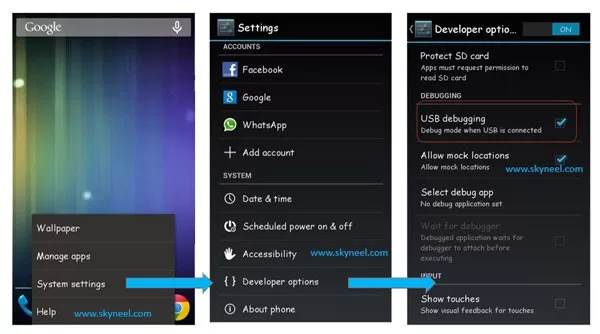
Step 3: Download Rootkit Click here and double click on Root kit and connect your phone to your computer via USB cable.
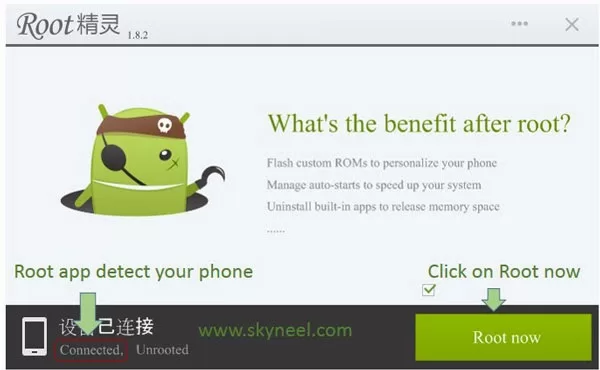
Step 4: Root kit will automatically detect your Device, Now click on “Root Now”.
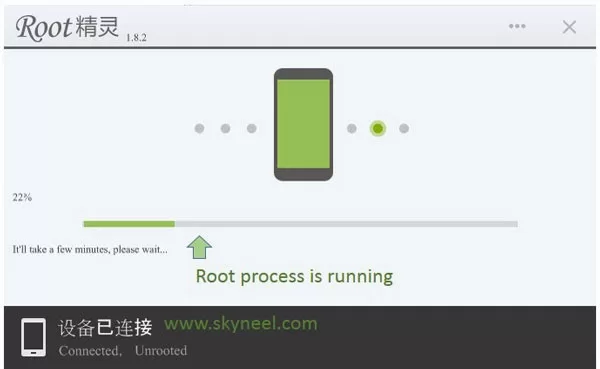
Step 5: Now Root processor start. After Root processor complete disconnect your Phone. Now your phone is rooted.
✅ Must Read: Android accessibility features provide better control
📌 Also Read: 11 Awesome Smartphone Tips and Tricks
If you want to check your Mobile rooted or not try this app Root checker
Must read:
- What to do if your phone got wet or fell into the water
- How to increase Internet speed in Android Device : 7 tips
Note: Please follow the instructions carefully. I will not take any responsibility on whatever may happen with your phone. Thanks & Credits: Gineus Root Application Developer SJRoot.