Hi, This is a easy guide to install new update Micromax A92 Canvas Lite Stock Rom V3. In this version Micromax integrated FOTA. Micromax A92 Canvas Lite powered by 1GHz Dual-Core with MT6577 chipset. It has 5 inch screen with 480×800 Pixels and 16M Colors.
Preparation of flash or update:
1. Take a backup of your phone Click here.
2. Take a backup of your IMEI no. by mobileuncle tool Click here.
3. Your phone battery should charge 80% minimum.
4. Read all steps then do it careful.
5. Make sure proper power backup of your PC.
Must Read: How to remove dalvik cache without using custom recovery
Download ROM and Tools of Micromax A92 Canvas Lite:
| File Name | Download link |
|---|---|
| Micromax A92 Canvas Lite Stock Rom V3 | Download |
| Micromax A92 Canvas Lite SP Tool V3.1248 | Download |
| Micromax A92 Canvas Lite USB Driver | Download |
How to install new update Micromax A92 Canvas Lite Stock Rom V3:
Step 1: Install drivers in your PC and Enable USB Debugging on your Phone. Go to Settings >>> Developer options >>> USB debugging check it ( If your phone have Android 4.2 or upper version then see how to enable Developer options here is guide of this Click here). After then switch off your phone.
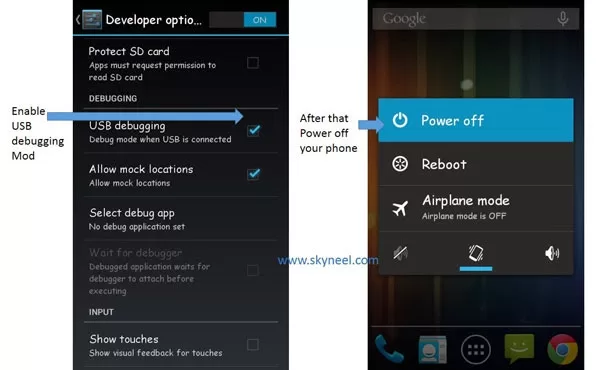
step 2: Extract the Stock ROM folder where you want
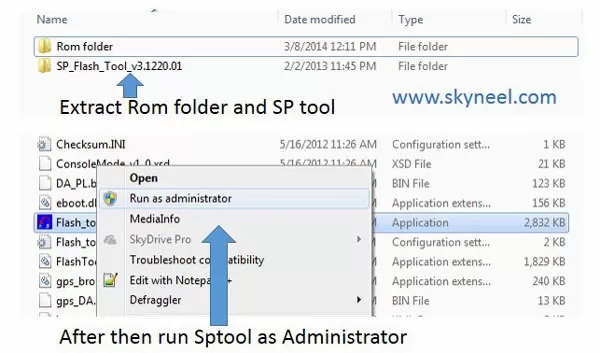
Step 3: Extract and open the SP Tool. Sptool.exe Run as Administrator
Step 4: Click on Scatter-Loading option.
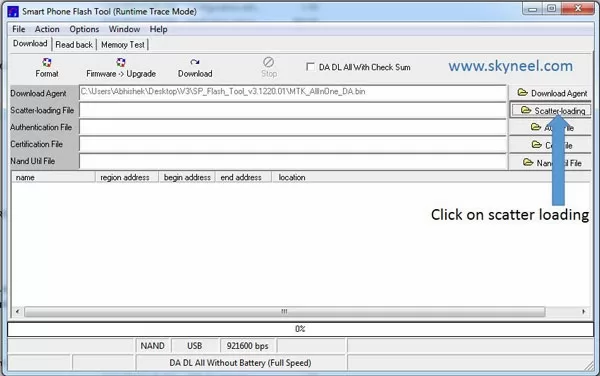
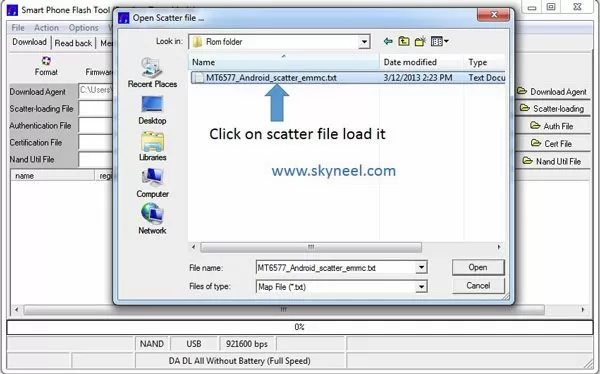
Step 5: SpTool ask you the location of the scatter file in your PC. You will find it in the extracted Stock ROM folder. Now go to the Rom folder and select the file “Android_scatter_emmc.txt” which is our scatter file.
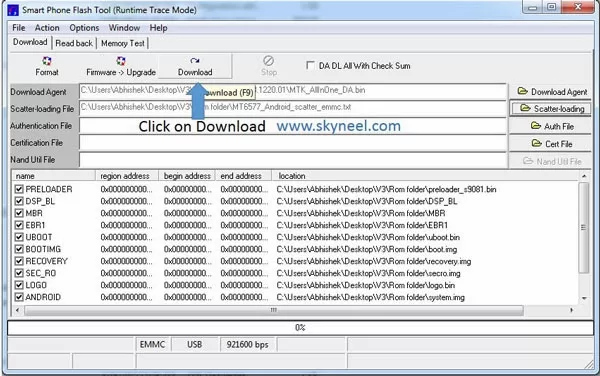
Step 6: Now click on Download.
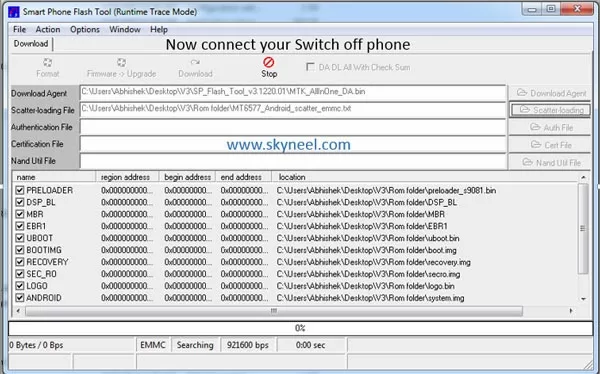
Step 7: Connect your switch off phone with PC via USB cable (Make sure your phone is switched off).
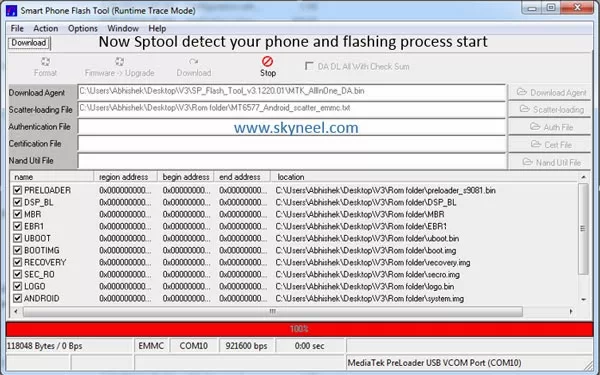
Step 8: SP Tool detect your phone and process will start. If Sptool is not recognize/detect your phone then install vcom driver read this post it will help you click here (Driver already in phone flash drive if you don’t have these drivers then install it)
Step 9: Now start downloading Stock Rom in your phone by flashing
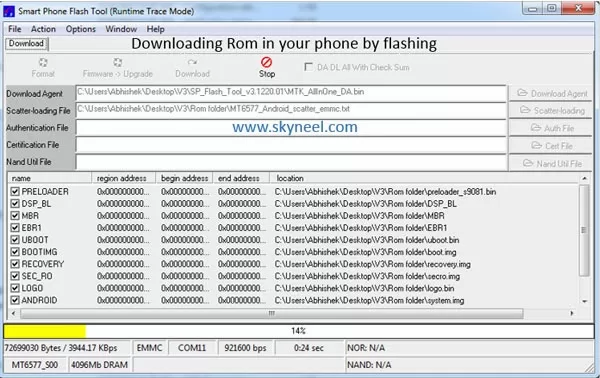
Note: Don’t interrupt this process as it can potentially brick your device. Make sure no power interruption takes place.
👉 Don't miss: How to Print Row or Column Headings on Each page in Excel
🔥 Trending: How to resolve Android Lollipop Camera and Flashlight issue
Step 10: After the process complete, a green ring will appear.
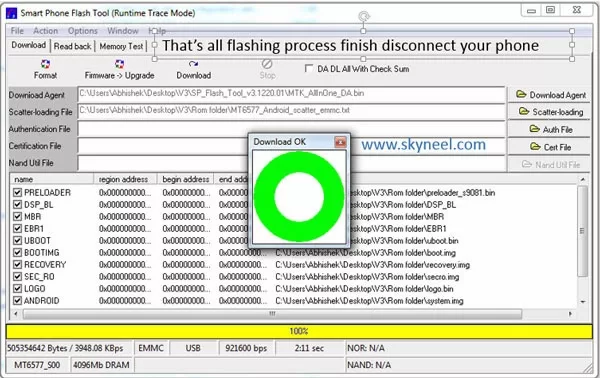
Step 11: Disconnect your phone. Now your phone is updated.
Must Read: How to use default call recorder app in Micromax phones
After update you can root Root your Canvas Lite because root allows for you to use a maximum of your phone without any restrictions.After root you will install custom apps, custom Rom and custom setting in your phone. But before root you must read Root Advantage and Disadvantage by this then root your phone here is root guide “How to Root Micromax A92 Canvas Lite” and How to install CMW/TWRP recovery in Micromax A92 Canvas Lite.
I hope you like this new update Micromax A92 Canvas Lite Stock Rom V3 installation guide from which you will be able to easily install new update Micromax A92 Canvas Lite Stock Rom V3 without any extra efforts. If feel any problem in this guide then please use comment box. Thanks to all.
Note: I am not responsible if you make Mistakes and Bricked Devices.
Hi
But I could not
find any Stock
Rom V3 of
Canvas Lite in
the given link.
Please Send
Me the Link.
Please.
Can you provide stock v2 link!!?? Pls!!
Can i flash this rom to canvas music which has the same chipset mt6577?
Hi
Don't flash this Rom on your canvas music because screen size change.
Can i flash this rom to canvas music which has the same chipset mt6577?
A big Thank you :) Bro !!
After 6 Hour I got my phone Live :) surly i will send you a gift if you pm your address :)
Although Flashing Official Stock rom is Very much dangerous task for everyone still this the Last way to out,because if Power gone or USB disconnected , Then i am sure your Phone will go to Emergency Mode with a Yellow Screen in this place no solution available for a smart phone ( becarful while Flashing ROM always use Original USB cable and the Battery of Laptop and Mobile not about to die) ,
Finally Lots of Thanks to Abhishek Sharma who posted the way of flashing in detailed,
Suggestions :-
>Upload the Firmware to other File Sharing Site which Give 32 Connection to download because i found 4shared failed to maintain the speed of download and sometimes it lost connections .
>Upload the latest Firmware Android 4.2.2 instead of the old stock firmware 4.1.2
Hope, you will not ignore my words…
welcome Anurag
thanks to your Suggestions, if you know good free file sharing site then tell me.
Stock Rom V2 is Android 4.2.2 but V3 is as you told 4.1.2 , In this version Micromax integrated FOTA. I don't know why Micromax revert back on previous version.
Micromax will release Android kitkat 4.4 for all Canvas series soon, so it is doesn't matter which version it is.
Good day enjoy your A92
Now a days every xda developers using Dropbox as their main file hosting , even Mediafire is also best one , Because there is no waiting for regular users as 4shared do for 20 sec, and Dropbox and Mediafire provide 32 Links in IDM so , the download speed also more then 4shared ,
Both are delete file without notification, I am face it
abhishek i reset the phone and its nt swtiching on…i am using sp tool to flash the phone …but i forgot to switch on debugging mode…sp tool is not working…what to do now..plz help
which android version of stock rom v3
This is the same rom Android 4.1.2 which is comes with your Handset :(
But Micromax fix some bug in this Rom
can I get a video of this full process ??
bro what if my cell gets brick??
Don't worry
Charge your battery 80% and install vcom driver in your PC then flash your Rom again
if sptool not detect your phone then your this method to flash your phone click here
problem in while flashing i watched your video but the % is not increasing.whats the problem plzz help
is your phone detect or not by SP tool?
how i know that my phone detected sp tool or not?
If sp tool detect your phone process will start
But I could not find any Stock Rom V3 of Canvas Lite in the given link. Please Send Me the Link. Please.
how to install driver
hi,
i am new one for flash rom.
i have micromax canvas a92 mobile.
i find the custom rom for canvas lite. ( i dont see you web page)
so i try to suvi rom for micromax a110 for flashing my canvas lite.
now i got a problem in my device.
when i flash this rom, i succeed my flashig.
then i reboot my device.
my mobile screen is show in white color.
my dovice does not to boot.
and i can't access to my CWM recovery mode.
and i try to flash my mobile using sp flash tool and vcom divers.
i cant install this vcom divers to my window 7 ultimate pc.
so flash tool does not consider my device.
now my mobile is just shut down.
please help me what i will do for it.
please help me. it is huge help for me.
Hi krish
install vcom driver
after install driver, flash your Rom via sptool
if you can not flash your Rom then read this post and follow all steps clcik here
Good Luck
Thnx Abhishek.
now i plan to change my rom, but my volume + button do not worked(The Button is Damaged.).
so how can i detect my mobile?
is it any other way for detect my mobile for flash?
and again thanx.
i learned android flash with your help.
and my RAM is not worked well,
can i expend my RAM?
i tried to swap my RAM, but the kernel not supported.
is it any other way for RAM.
i got so many times "LOW MEMORY" message in my A92.
Dear Abhishek, Nice article
thanks