Hi, This is an approved official Android 7.0 Nougat Beta Rom of Coolpad Note 5. This is a fully working and approved installation guide to install Official Android 7.0 Nougat Rom for Coolpad Note 5.
When I want to install Android Nougat Rom on my Coolpad Note 5, then I tried so many methods and read lot of guides, but I found so many mistake in these guides. So I am trying to make a prefect guide for you. The official Android 7.0 Nougat for Coolpad Note 5 is a beta build and rolling via OTA, but you can also Update Coolpad Note 5 to Android Nougat Manually. In this guide you will get all required tools and drivers.
Preparation of flash or update:
1. Take a backup of your phone by this guide.
2. Your phone battery should charge 80% minimum.
3. Make sure proper power backup of your PC.
Must Read: How to Protect Google account with USB Security Key
Download ROM and Tools of Coolpad Note 5:
| File Name | Download link |
|---|---|
| Coolpad Note 5 Android Nougat Beta Rom | Download |
| Coolpad Note 5 YGDP Tool V4.0.3 | Download |
| Coolpad Note 5 USB Driver | Download |
How to flash or install Official Android 7.0 Nougat Rom for Coolpad Note 5:
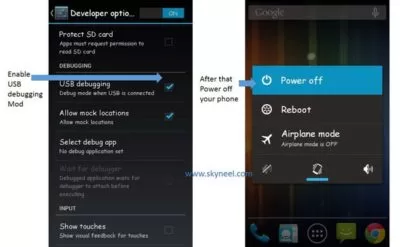
Step 1: Install drivers on your PC and Enable Developer Mode and USB Debugging on your Phone by this guide. After then switch off your phone.
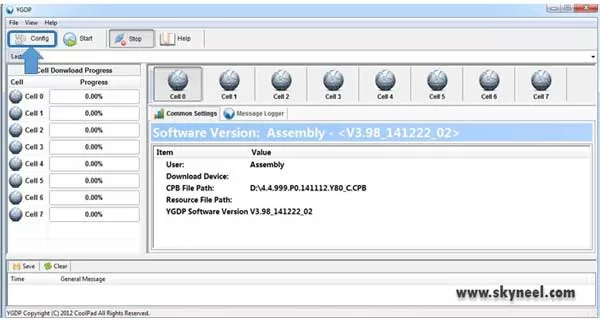
Step 2: Extract ROM and YGDP Tool folder, where you want to save. Now install YGDP tool then open and run this tool. YGDP tool will asked enter password then enter password 9527 and click on Login option.

Step 3: You will see main window of YGDP tool on your PC. Now find config option and click on it.
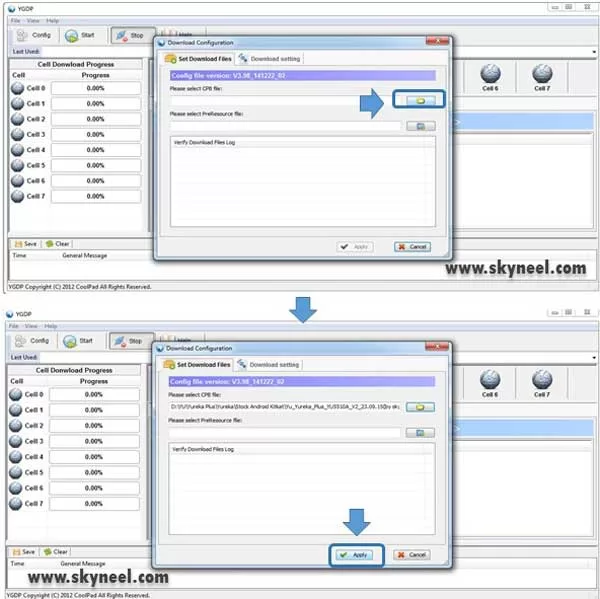
Step 4: Now you will get a pop window, here you will select CPB file from your Rom folder. Then click on apply button.
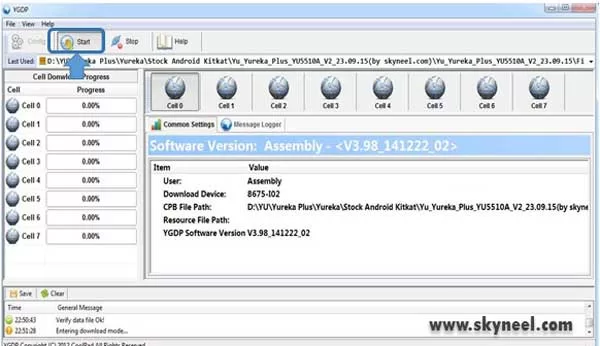
Step 5: Connect your Coolpad Note 5 in Fastboot Mode (make sure switch off your device and press volume up key and connect to usb cable), then click on Start button.
Note: Don’t interrupt this process as it can potentially brick your device. Make sure no power interruption takes place.
Step 6: Now start downloading Rom in your phone by flashing. After the process complete, your Yu yureka is automatically boot in Android Rom.
👉 Don't miss: How to know your Gmail account is hacked or not
🔥 Trending: Solution to fix Reliance Jio Sim network issue in your phone
Must Read: Important tips to keep safe important data of smartphone
Tips for Coolpad Note 5:
After install or flash Official Android 7.0 Nougat firmware for Coolpad Note 5, you can root your phone because root allows you to use a maximum of your phone without any restrictions. After root you will install custom apps, Rom and custom setting in your phone. But first read Root Advantage and Disadvantage by this article then, this root guide.
I hope you like this install Official Android 7.0 Nougat firmware for Coolpad Note 5 installation guide from which you will be able to easily install Android Nougat firmware on Note 5 without any extra efforts. If feel any problem in this guide then please use comment box. Thanks to all.
Note: I am not responsible if you make Mistakes and Bricked Devices.
cbp file fail bata raha hai kYA KARU
Re-download that file
Doea all the problem like network issue solve and are their any bug plz tell
Bro is there any update for coolpad note3
if any please mail me!…..
I reboot Coolpad note 5 lite phone then it shows malfunction software like unautherised software not use for this device for private and security purpose .i can’t update Android 6 to nougat. please solve this problem.
Dual Apps Not Working after Update Coolpad Note 5
Thanks so much I updated my coolpad note 5 to nougat v223
DOWNLOAD KINGROOT from ur phone browser,
try using king root
my 1.54 gb data is totlly waste your CPB file is damage……dont try fool anyone ..
Hello Chirag,
download in Computer/ Laptop. then Extract. Its working.
Thanks
Hey… I’ve flashed my Coolpad note 5 with nougat rom and it is on version v217…and not giving me further updates to v235. What should i do now
coolpad note 5 nougat 7 is availabele or not
hello Hardik,
Its a 7.0 Nougat Rom for Coolpad Note 5
bro sugget me how to update we try to many time download but all time get corrupted cpb file
and send me correct link for nougat because we try to many time download but all time get corrupted cpb file
sir,
Am coolpad note5 user, my phone android is masumalem but I need nouget osen what can do for it… Please help me..
Thank you.
Stable ota update coolpad note 5 released date
Hi how i can root coolpad note 5 after installing nought beta rom
Plzzz reply
Pls send coolpad note 3 ki official aproved 7.0 naught flash file
hi mujahid,
Coolpad india has not given any roms official Nougat rom for Coolpad Note 3
If i get flashed with nougat rom in coolpad note 5 is its warranty will be loss?
No This is an official Rom From Coolpad.
how can I root after that ? please reply