This is Root Guide of Canvas turbo A250 and Canvas HD A116. In this method you can easily root your phone without PC. These phone have good hardware and features. So root your phone and make it smarter and featured by custom Apps, Rom and settings. Now Micromax release 5th update of this phone Stock Rom V5. Micromax will release KitKat update for canvas phone soon. Canvas turbo A250 is also a Good phone and It got fourth update Stock Rom V4. So must update your phone. here is root process of these phone.
Preparations of Root:
1. Take a backup of your phone Click here.
2. Your phone battery should charge 80% minimum.
3. Read all steps then do it carefully.
Must read: TWRP 2.5.0.0 and CWM 6.0.3.3 Recovery for Micromax A116 Canvas HD
Steps to Root Canvas Turbo and Micromax A116:
Step 1: Download Framaroot app click here.
Step 2: Copy Framaroot app in your phone internal storage or external SD card.
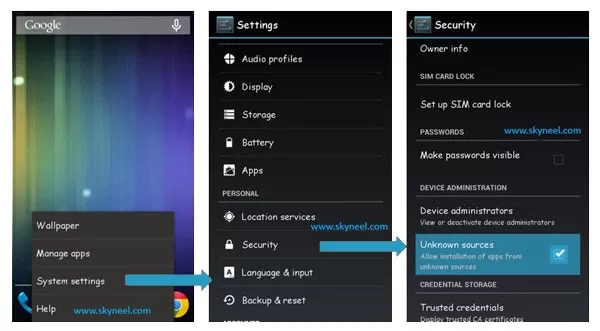
Step 3: Go to setting >>> tap on security >>> tick on unknown sources box (After install un-tick this option don’t forget it).
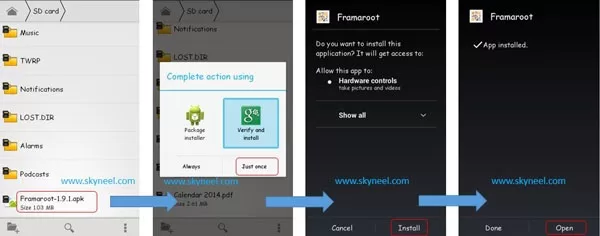
Step 4: Install Framaroot App on your phone. Tap on App >>> Tap on verify and install >>> Tap on Just once >>> Install.
Step 5: Open the Framaroot App and Select “Install Super Su”
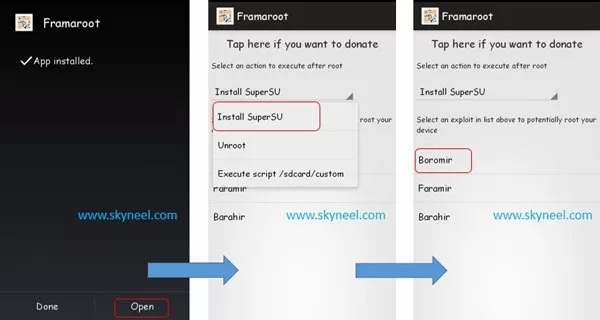
Step 6: Click on “Boromir”
Step 7: Now Reboot your Mobile. That’s all
After this root process you will find SU app in your application menu. You can manage your rooted phone by Su app. Su app work as like firewall, So you should be careful in giving permission to the any app by Su app. If you want to check your Mobile rooted or not try this app Root checker
Must read: Install CMW recovery in Micromax A250 Canvas Turbo
✅ Must Read: How To Track Voter ID Application Status Online
📌 Also Read: How to logout a Gmail account?
How to unroot your Canvas Turbo and HD phone :
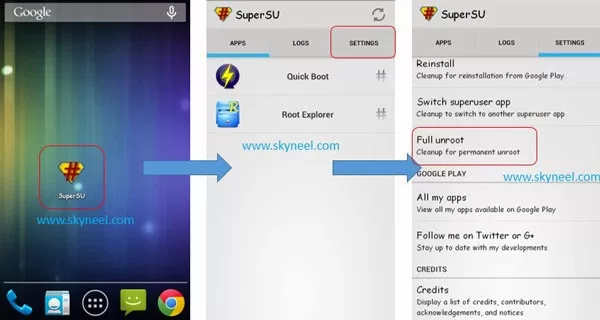
It is must for you to know how to unroot your phone. When you feel that you don’t want rooted phone then you can easily un-install root app and unroot your phone. Here is simple steps to unroot your device. You can also see unroot process in this image.
Open Su App >>> Setting >>> Full Unroot that’s all
This is simple and easy root process for your device. I can try to make it easy and make all steps clear to understand and try to make image all step for you. If your feel any problem then please comment us. I try to best resolve your problem. Thanks and Credits : Alephzain, Developer of Framaroot App.
Oh Thnx a lot for early reply.. so after rooting will I be able to update my android version jelly beans to lollipop?
Hi
Root is not required for updating your phone and Micromax does not release lollipop Rom for micromax A116 canvas hd.
Sir, I have micromax canvas hd which I brought it on 18 July 2013 which was at that time of version 4.1.2 … can I root my phone using ur framaroot app.. I fear my phone of getting bricked.. pliz help.. anticipating an early reply..
Hi
yes you can use framaroot app, this is safe method to root your phone.
My McAffe antivirus on pc says Framaroot app contains virus named "Artemis Trojan" and it wont allow to download it. If I download it by disabling antivirus then will this virus affect my PC and Mobile?
on opening framaroot app it reads "your device seems not vulnerable to exploit included in framaroot" it is a canvas hd a116.
Hi Sarthak
Can you explain more?
Hii yesterday I gave my phone for repair in Micromax service center and after that its showing invalid IMEI no and they are saying its not their fault, what to do now my phone(Micromax A89) is not rooted.
Hi Sahil
Send a simple notice by consumer court they will repair it.
Hi can i install it on my canvas 2+ A110Q & tell me can there is a danger of bricked my phone??
yes you can use it
it is safe
Hi i rooted my phone root checker show that my phone is rooted but super su can't shown up.it only say that super user installed but it can't
Please tell me what should i do
Install Su app in your Mobile
open Framaroot app and select insall Su app then tap on “Boromir”
thnxx sir your information is always helpful
welcome Udit
Join us on Facebook and Google plus for our new post and update
Please tell how to install custom rom in a116 recovery mode there is no advanced option available please help me
Can we use for all android device
hi Jwala
try in your mobile then share your view with us
M talking about d turbo…
Micromax canvas turbo is nice phone with good hardware, so it is deserve Android 4.4 Kitkat update. but it is depend on Micromax. when it will release we are provide you.
so stay tune this blog and join Facebook and Google +
Hey man… After rooting Will v able to officially update to KitKat when the update comes…?
It worked on my turbo. Now I would be able to delete all those unwanted apps.. Thanks dude.
welcome
join us on Facebook and Google +