Hi, This is a tutorial for install TWRP recovery and root LeEco Le 1s Eco EUI 5.8. In this guide you will find all steps with image, therefore it is safe and easy method of install TWRP recovery and root Le 1s Eco EUI 5.8.
LeTv LeEco Le 1s Eco EUI 5.8 has 1.8GHz octa-core MediaTek Helio X10 processor along with 3GB RAM and 32GB ROM. This phone has 5.5 inches IPS screen size with 1080×1920 pixels. This phone has 13 mega pixels rear camera with LED flash and 5MP front camera in LeTv LeEco Le 1s Eco EUI 5.8.
LeTv LeEco Le 1s Eco EUI 5.8 is great phone and you must be root LeTv LeEco Le 1s Eco EUI 5.8, because root allows for you to use a maximum of your phone without any restrictions. After root you will install custom Rom, apps, and setting in your phone. But before root you must read Root Advantage and Disadvantage by this post. Then after follow these steps to root your phone.
Preparation of flash or update:
1. First, you should take a backup of your phone.
2. Your phone battery should be charge minimum 80%.
3. Make sure proper power backup of your PC.
Must Read: How to find your lost phone with Android Device Manager on Google
Download tool for install TWRP recovery and root LeTV Le 1s Eco EUI 5.8
| FILE NAME | DOWNLOAD LINK |
|---|---|
| LeTv LeEco Le 1s Eco EUI 5.8 TWRP and SuperSu Rar | Download |
| LeTv LeEco Le 1s Eco EUI 5.8 USB Driver | Download |
Easy steps to install TWRP recovery and root LeTV Le 1s Eco EUI 5.8:
Step 1: First of all you must have to enable Developer option, then enable debugging mode on your phone, here is guide and unlock bootloader LeTv LeEco Le 1s Eco EUI 5.8. Now Install USB drivers on your PC
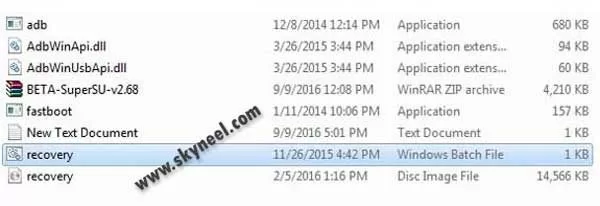
Step 2: Download TWRP and SuperSu.rar file and extract this file on your PC/laptop desktop. Now copy SuperSu Zip in your phone memory.
Step 3: Now double click on recovery.bat file and now you will show WAIT FOR FASTBOOT MODE AND PRESS A KEY then press A and wait.
Step 4: Now you will show FLASH Recovery, press a key when done in cmd windows and follow this and press a.
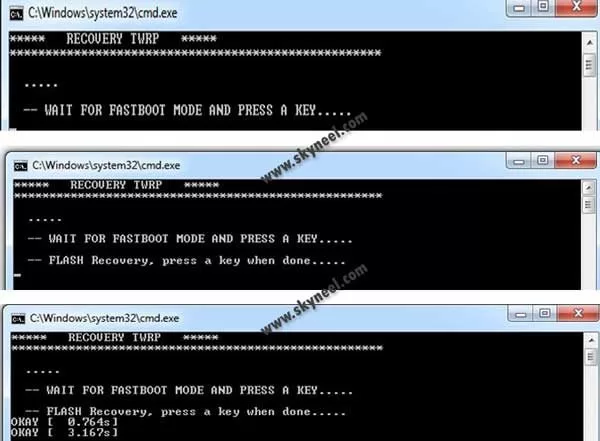
Step 5:Now your device in boot Recovery mode and cmd window is closed automatically.
Note: – Don’t interrupt this process as it can potentially brick your device. Make sure no power interruption takes place.
Step 7: Now disconnect your phone and do not start your phone. Press and hold volume up with power button until you can see recovery option, then select “recovery mode” (If your touch not work then use volume up and down key for menu up and down and Power button as a enter button)
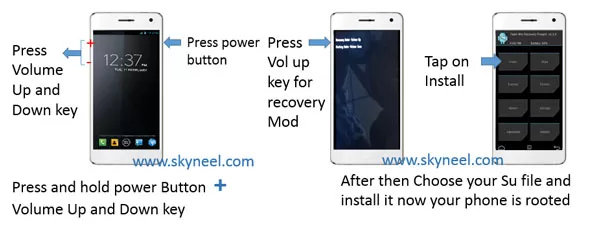
Step 8. Tap on install tab and select “SuperSU.zip”file from your save location on your SD card and install this file. Now reboot your phone.
Note: if your device is a bootloop and blinking problem, now you can flash userdata again from step 4.
Must Read: How to launch camera by double tap on Android phone
✅ Must Read: Excel Fact Function - Return Factorial of Number
📌 Also Read: Best Hidden iOS 14 features, you must have to know
How to unroot LeTv LeEco Le 1s Eco EUI 5.8:
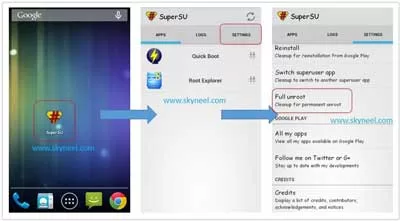
It is must for you to know, how to unroot LeTv LeEco Le 1s Eco EUI 5.8 Smartphone. When you feel that you don’t want rooted phone, then you can easily unroot your phone by un-install root app. Here is simple steps to unroot your device. You can also see unroot process in this image.
Step: First of all open Su App from your app menu and tap on Setting. Now scroll and find “Full Unroot” option and tap on it. that’s all.
I hope you like this How to install TWRP recovery and root Le 1s Eco EUI 5.8 guide from which you will be able to easily install TWRP recovery and root LeEco Le 1s Eco EUI 5.8 without any extra efforts. If feel any problem in this guide then please use comment box. Thanks to all.
Note: I am not responsible if you make Mistakes and Bricked Devices.
Sir my phone me calling problem h Kya Kru
hi rupesh,
you can flash a fresh 5.8.14s EUI rom and flash 5.8.17s EUI, then flash 5.8.19s EUI ROm and enable VoLTE.
thanks
Hello sir. Can i root my phone without download this usb driver?
usb driver is must to connect your device to pc, so download usb driver and root your device.
Hi!
Have watched a lots of video about rooting Letv 1s, running twrp and then enabling volte. And then ended up confused. Too much of analysis has led to paralysis.
Request you to help me with the whole process step by step, else I screw my phone. I ain’t even aware how to take a backup before initiating the process.
I am using LetV 1s X507 with 5.8.019s installed.
Rgds
Friend I have same issue have you done volte in your phone then help me.
what i do when my le1s eco stuck and my vollume up and down botton is damaged how i solve this problem
is it safe to root my leeco le1S??
yes
Hi sir ,how to enable volte in my leeco le 1s
Hi Ravi Here is guide to enable volte leeco le 1s.
Is this 3.0.2 version of twrp…??????
Hello sir
What if I install twrp and then unroot my phone wil this work?
Yes
Will this method work using Windows 10?
According to someone on xda website this method will work only using windows 7. Is that true?
hi akshay ,
no its working on all windows but you install Vcom driver for windows 10.
Bro how to install eui ROM back in letv le1s using twrp .pls help me i did not backup the old rom and cleared all data and installed miui 7 rom now I want to come back to eui ROM pls help me I am stuck in miui 7 it sucks
Hi samuzzain ,
you can flash EUi 5.8.019s using Sptool through this guide