Hi, Xiaomi launched MIUI 8.5 Global stable Rom. This is a MIUI 8.5.2.0 Global Stable Rom for Xiaomi Redmi 4 and here is an easy and safe tutorial for install new update Redmi 4 MIUI 8.5.2.0 Global stable Rom.
Xiaomi Redmi 4 is a Smartphone phone which is available in Dual SIM with 5.0 inch display. Xiaomi Redmi 4 has a 13 megapixel camera, 5 megapixel secondary cameras and runs a Qualcomm Snapdragon 425 chipset.
Must Read: How to install custom fonts in Android phones
1. Take a backup of your phone Click here.
2. Your phone battery should charge 80% minimum.
3. Read all steps then do it careful.
Download Rom and tools of Redmi 4 MIUI 8.5:
| File Name | Download link |
|---|---|
| Xiaomi Redmi 4 MIUI 8.5.2.0 Recovery Stable Rom | Download |
| Xiaomi Redmi 4 MIUI 8.5.2.0 FastBoot Stable Rom | Download |
| Xiaomi Redmi 4 USB Driver | Download |
| Xiaomi Mi Flash Tool | Download |
Method 1: Recovery Rom
How to install Xiaomi Redmi 4 MIUI 8.5.2.0 Recovery stable Rom:
This is easiest method for install MIUI 8.5.2.0 in your Xiaomi Redmi 4. Just follow these steps:
Step 1: Download MIUI 8.5 zip file and rename this zip file as “update.zip” like miui_HM4AGlobal_V8.5.2.0.MCCMIED_1f1028ceb6_6.0.zip to update.zip.
Step 2: Connect your phone to PC and copy the zip file into your Phone Internal Storage. Do not copy the zip file into any folder or SD card!!
Step 3: Go to Updater App from your phone app menu, tap on the setting icon, it is a 3 dots icon on top right corner (see in this image) and tap on the “Choose update package” tab. Now you can see your phone storage, Scroll down and tap on the update.zip file. See in this image.
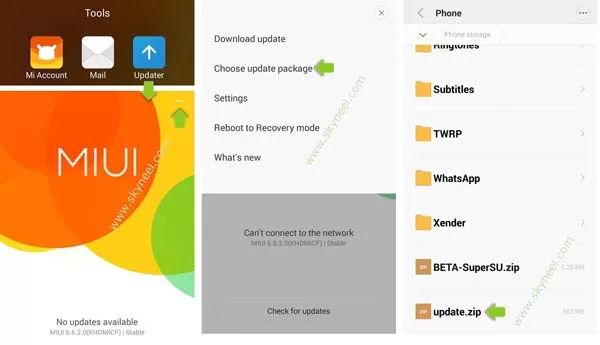
Step 4: Now your phone is going to Reboot in recovery mode and Rom flashing process start. Don’t interrupt this process, it might to take 4-6 minutes for your phone to first boot on MIUI 8.5.2.0 Global stable Rom.
Must Read: Install Magisk on Xiaomi Redmi 4 (Magisk Manager)
Method 2: FastBoot Rom
Install new update Xiaomi Redmi 4 MIUI 8.5.2.0 FastBoot stable Rom:
Step 1: Download and install Mi Flash Tool and download Xiaomi Redmi 4 MIUI 8.5.2.0 FastBoot stable Rom and extract zip or rar file in desktop on your PC. Now Power Off your device and long press volume down and power button to FastBoot mode. See in this image.

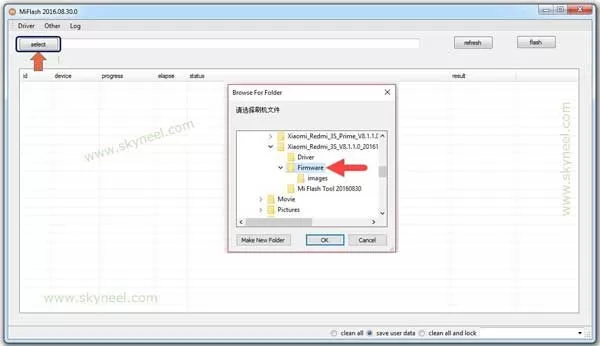
Step 2: Your phone is going to FastBoot mode. Now, connect your Xiaomi device to computer using USB cable. And Open Xiaomi flash tool and locate the Xiaomi stock firmware and click on refresh button, this will allows Xiaomi flash tool to recognize your device.
🔥 Trending: Solutions for some common Problems of Android Smartphones
✅ Must Read: Combine multiple active workbooks to another workbook in Excel
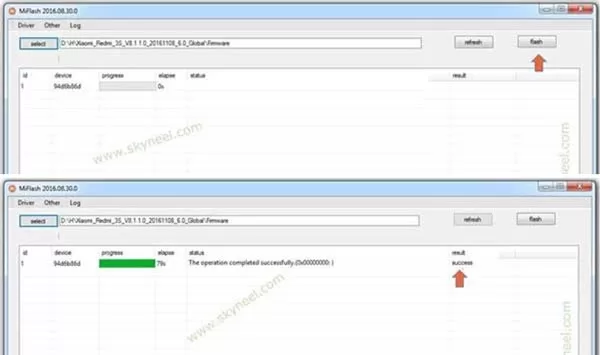
Step 3: Now, click on Flash button to start flashing process. Once, flashing process is completed you will see Success message in Xiaomi Flash Tool.
Must Read: How to check Who is Visited or Viewed My WhatsApp Profile?
After install new update Redmi 4 MIUI 8.5.2.0 Global stable Rom, you can root your phone because root allows you to use a maximum of your phone without any restrictions. After root you will install custom apps, Rom and custom setting in your phone. But first read Root Advantage and Disadvantage by this article.
I hope you like this new update Redmi 4 MIUI 8.5.2.0 Global stable Rom installation guide from which you will be able to easily install new update Redmi 4 MIUI 8.5.2.0 Global stable Rom without any extra efforts. If feel any problem in this guide then please use comment box. Thanks to all.