Hi, This is a tutorial for install TWRP recovery and root Huawei Honor 3C. In this guide you will find all steps with image, therefore it is safe and easy method of install TWRP recovery and root the Huawei Honor 3C.
Huawei Honor 3C has 1.3GHz Quad core processor along with 2GB RAM and 8GB ROM. This phone has 5.0 inches IPS screen size with 1280*720 pixels. This phone has 8 mega pixels rear camera with LED flash and 5MP front camera in Huawei Honor 3C. Huawei Honor 3C is great phone and you must be root Honor 3C, because root allows for you to use a maximum of your phone without any restrictions. After root you will install custom Rom, apps, and setting in your phone. But before root you must read Root Advantage and Disadvantage by this post. Then after follow these steps to root your phone.
Preparation of flash or update:
1. First you should take a backup of your phone.
2. Your phone battery should be charge minimum 80%.
3. Make sure proper power backup of your PC.
Must Read: How to change Boot Animation in Android phone in easiest steps
Download tool for install TWRP recovery and root Honor 3C
| FILE NAME | DOWNLOAD LINK |
|---|---|
| Huawei Honor 3C Scatter file | Download |
| Huawei Honor 3C SP Tool V3.1344 | Download |
| Huawei Honor 3C USB Driver | Download |
| Huawei Honor 3C TWRP Recovery | Download |
| Huawei Honor 3C SuperSU Zip | Download |
Easy steps to install TWRP recovery and root Huawei Honor 3C:
Step 1: First of all you must have to enable Developer option, then enable debugging mode on your phone, here is guide. Now Install USB drivers on your PC
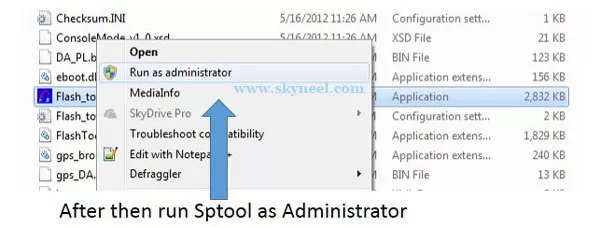
Step 2: Download SuperSU file and copy this file on your phone memory card. Now Download TWRP recovery and scatter file and extract these file in the folder where you want to save. Extract and open SP Tool and run Sptool.exe Run as Administrator.
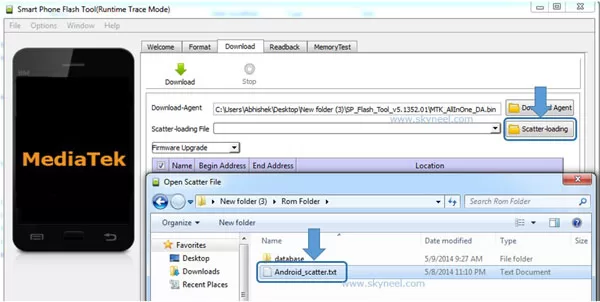
Step 3: You will see an SP tool window, now click on the scatter-Loading option in the SP tool. Then you will get the new tab of SP Tool which you ask the location of the scatter file on your PC. Now select the “MT6582_Android_scatter.txt” file. See in this image.
Step 4: You can see RECOVERY already selected and SP Tool show these file location. Now click on Download option in the Sp Tool, then connect your switch off phone with PC via USB cable (Make sure your phone is switched off).
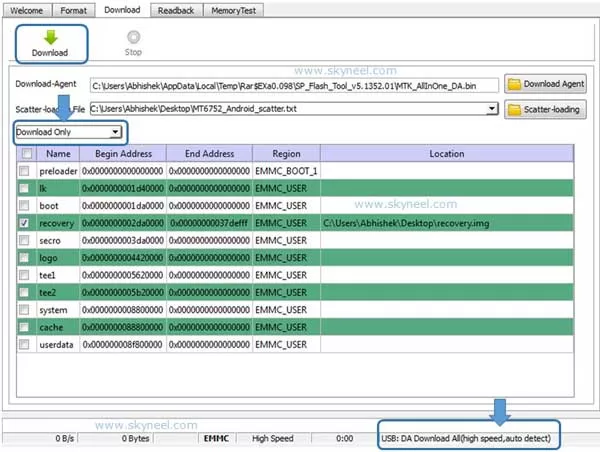
Step 5: SP Tool detect your phone and process will start. If Sptool is not recognize or detect your phone then install vcom driver, here is guide (Driver already in phone flash drive if you don’t have these drivers then install it)
Note: – Don’t interrupt this process as it can potentially brick your device. Make sure no power interruption takes place.
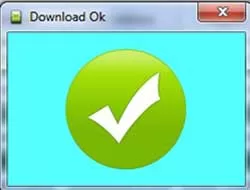
Step 6: After the process complete, a green ring will appear.
Step 7: Now disconnect your phone and do not start your phone. Press and hold volume up & down key with power button until you can see recovery option, then select “recovery mode” (If your touch not work then use volume up and down key for menu up and down and Power button as a enter button)
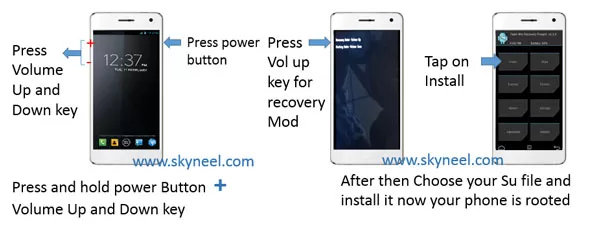
Step 8. Tap on install tab and select “SuperSU.zip”file from your save location on your SD card and install this file. Now reboot your phone.
Must Read: How to install custom fonts in Android phones
✅ Must Read: How to use filter command in Microsoft Excel
📌 Also Read: How to track the stolen smartphone's location
How to unroot Huawei Honor 3C:
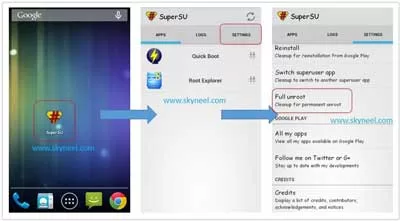
It is must for you to know, how to unroot Honor 3C Smartphone. When you feel that you don’t want rooted phone, then you can easily unroot your phone by un-install root app. Here is simple steps to unroot your device. You can also see unroot process in this image.
Step: First of all open Su App from your app menu and tap on Setting. Now scroll and find “Full Unroot” option and tap on it. that’s all.
I hope you like this How to install TWRP recovery and root Honor 3C guide from which you will be able to easily install TWRP recovery and root Huawei Honor 3C without any extra efforts. If feel any problem in this guide then please use comment box. Thanks to all.
Note: I am not responsible if you make Mistakes and Bricked Devices.
Hi
I can’t download anything google drive says you need access!!!!
Hi, thanks for the wonderful guide, but I have a problem with flashing twrp, my phone connects and reconnects continuously after connecting it without battery, can you help me out???
Hi, in your issue tree option will work. 1. Try to install your driver correctly 2. Go to the option in the SP tool then click on download then check on USB checksum in the DA DL All with Checksum box. 3. change your USB cable.