Hi, This is unbrick Xiaomi Redmi Note 3 Stock Rom by Xiaomi and in this post we will know how to flash stock Rom of Xiaomi Redmi Note 3 by easy and safest method. Xiaomi Redmi Note 3 has MediaTek Octa Core 2.0 GHz processor and a 5.5 inch screen with 1080 x 1920 Pixels resolution. It has 3GB RAM, 32GB storage, 13 MP Rear and 5 MP Front Camera. True color (16 M) and 5.0 Android Lollipop based MIUI 7.
Preparation of flash or update:
1. Take a backup of your phone Click here.
2. Your phone battery should charge 80% minimum.
3. Read all steps then do it careful.
4. Make sure proper power backup of your PC.
Must Read: What I can do when Google Play Store is not working?
Download ROM and Tools of Xiaomi Redmi Note 3:
| File Name | Download link |
|---|---|
| Xiaomi Redmi Note 3 China Stable Rom(7.2.3.0) | Download |
| Xiaomi Redmi Note 3 China Developer Rom(6.3.24) | Download |
| Xiaomi Redmi Note 3 SP Tool V5.1616 | Download |
| Xiaomi Redmi Note 3 USB Driver | Download |
How to unbrick Redmi Note 3 Stock Rom :
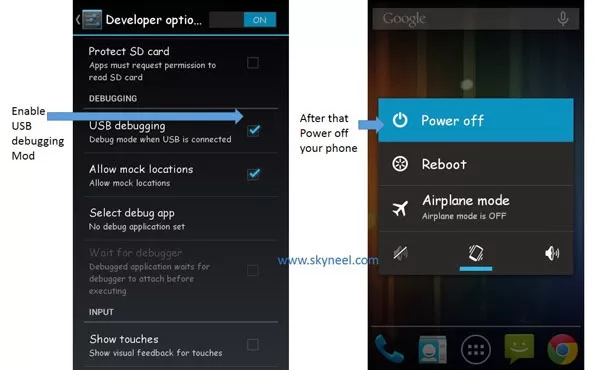
Step 1: Install drivers on your PC and Enable USB Debugging on your Phone. Go to Settings >>> Developer options >>> USB debugging check it ( If your phone have Android 4.2 or upper version then see how to enable Developer options here is guide of this Click here). After then switch off your phone.
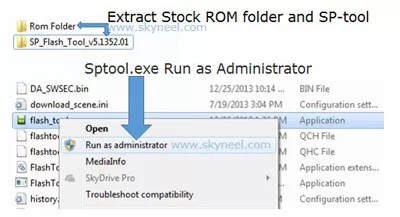
Step 2: Extract Stock ROM and SP Tool folder, where you want. Open the SP Tool and run Sptool.exe as Administrator.
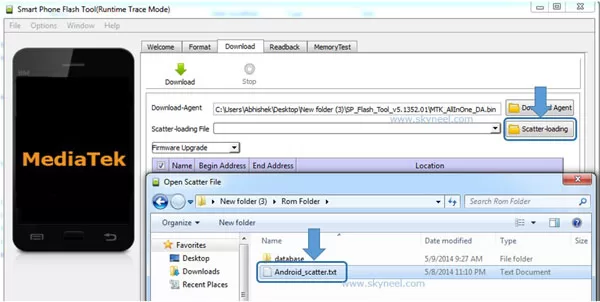
Step 3: Click on Scatter-Loading option. SPTool ask you the location of the scatter file in your PC. You will find it in the extracted Stock ROM folder. Now go to the Rom folder and select the file “Android_scatter_emmc.txt” which is your stock Rom scatter file.
Step 4: Now Select firmware upgrade from drop-down menu then click on Download. And Connect your switch off phone with The PC via USB cable (Make sure your phone is switched off).
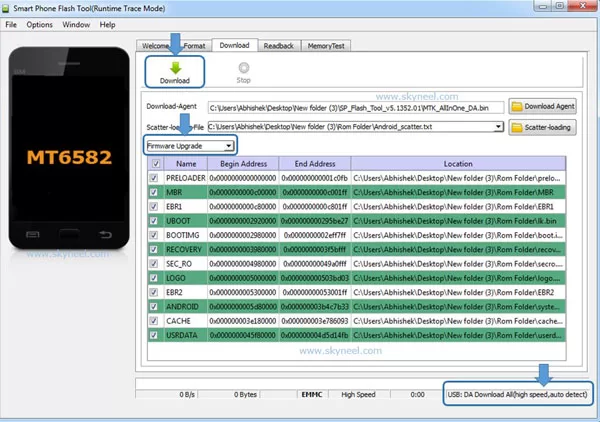
Step 5: SP Tool auto-detect your phone and process will start. If Sptool is not recognize/detect your phone then install vcom driver read this post it will help you click here (Driver already in phone flash drive if you don’t have these drivers then install it). After install Vcom driver reconnect your switched off phone with the PC. If you phone again not recognized by your SP Tool then try to flash via Meta mode flashing process, here is Meta-Mode flash guide click here.
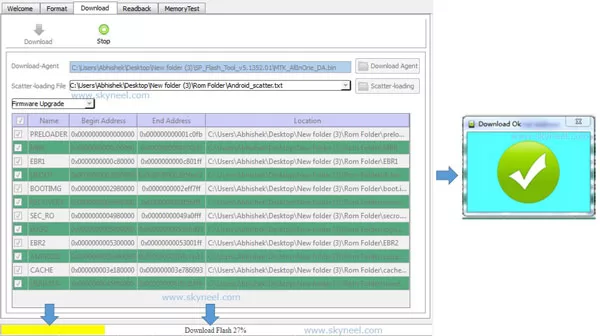
Note: Don’t interrupt this process as it can potentially brick your device. Make sure no power interruption takes place.
👉 Don't miss: Using PPMT Function Creating a Mortgage Calculator in Excel
🔥 Trending: How to create, view and upload 360 degree 3D Photo on Facebook
Step 6: Now start downloading Stock Rom in your phone by flashing. After the process complete, a green ring will appear. Now disconnect your updated Smartphone.
Must Read: How to close all background running apps at once on Android
I hope you like this Unbrick Redmi Note 3 Stock Rom installation guide from which you will be able to easily Unbrick Xiaomi Redmi Note 3 Stock Rom without any extra efforts. If feel any problem in this guide then please use comment box. Thanks to all.
Note: I am not responsible if you make Mistakes and Bricked Devices.
how can i debuging the phone while my phone is bricked?did u know what the meaning is bricked???
This means is soft brick and you can live your phone by flashing your stock Rom.