Micromax Release new update Stock Rom V5 of Micromax A250 Canvas Turbo. In this update Micromax fixed the Facebook video issue and release same Android version. We hope that the next update will be Android KitKat. After reading this article you will get the answer of your question how to update Micromax A250 Turbo with new stock Rom V5.
Now update your Micromax A250 Canvas Turbo with stock Rom V5 but first you take a backup of your phone Click here. Canvas Turbo has 1.5 GHz MediaTek Quad Core processor and a 5 inch screen with FHD resolution. And most attractive features are 2GB RAM, 16GB phone storage, 13MP Rear and 5MP Front Camera. This is much batter phone as compare canvas 4. Canvas Turbo has Screen 1920×1080 resolution, True color (16.7 M) and Android 4.2.1. This phone has 0.98GB Internal Memory for apps installation and 12.47GB for user.
Must Read: How to improve Android smartphone battery life with 7 tips
Preparation of flash or update:
1. Your phone battery should charge 80% minimum.
2. Make sure proper power backup of your PC.
3. Read all steps then do it careful.
Download Rom and tool of Micromax A250 Turbo:
| File Name | Download link |
|---|---|
| Micromax A250 Canvas Turbo Stock Rom V5 | Download |
| Micromax A250 Canvas Turbo SP Tool v3.1312.0.139 | Download |
| Micromax A250 Canvas Turbo USB Driver | Download |
Steps to update Micromax A250 Turbo with New Stock Rom V5:
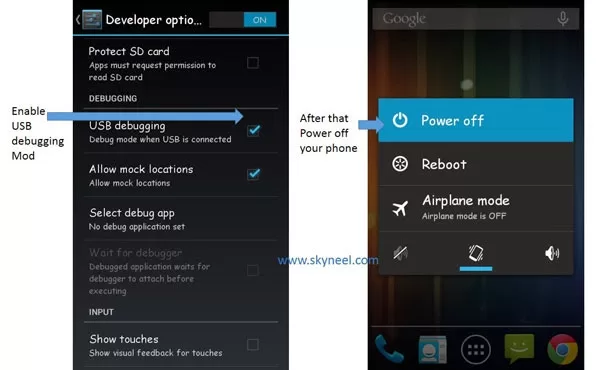
Step 1: Install drivers in your PC and Enable USB Debugging on your Phone. Go to Settings >>> Developer options >>> USB debugging check it ( If your phone have Android 4.2 or upper version then see how to enable Developer options here is guide of this Click here). After then switch off your phone.
Step 2: Extract the Stock ROM folder where you want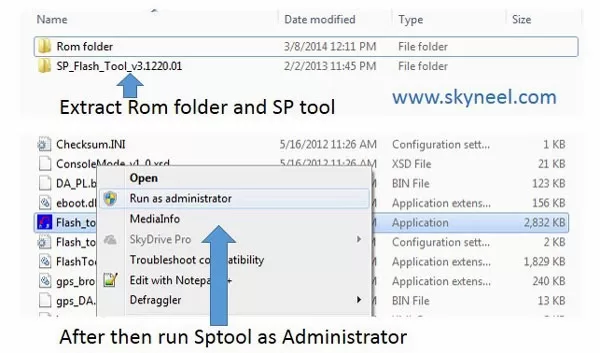
Step 3: Extract and open the SP Tool. Sptool.exe Run as Administrator
Step 4: Click on Scatter-Loading option.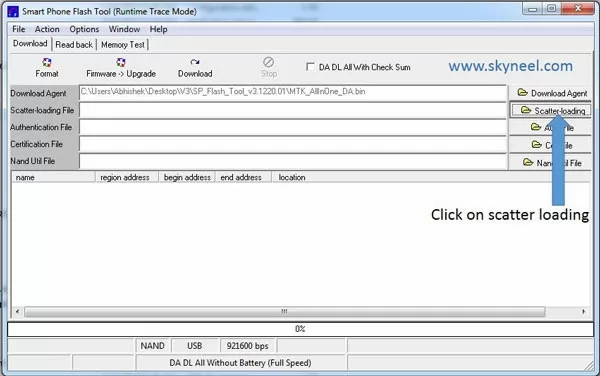
Step 5: SpTool ask you the location of the scatter file in your PC. You will find it in the extracted Stock ROM folder. Now go to the Rom folder and select the file “Android_scatter_emmc.txt” which is our scatter file.
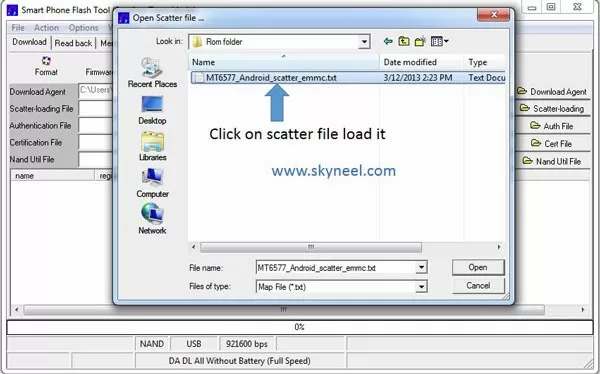
Step 6: Now click on Download.
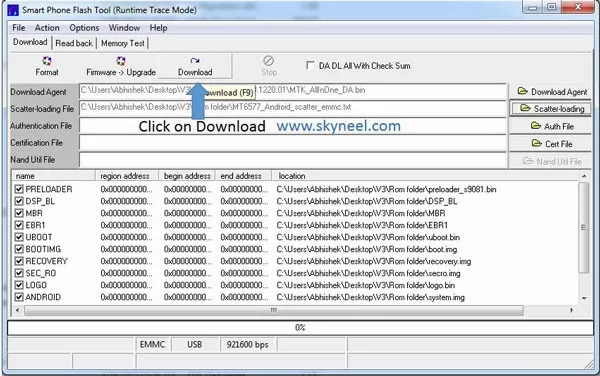
Step 7: Connect your switch off phone with PC via USB cable (Make sure your phone is switched off).
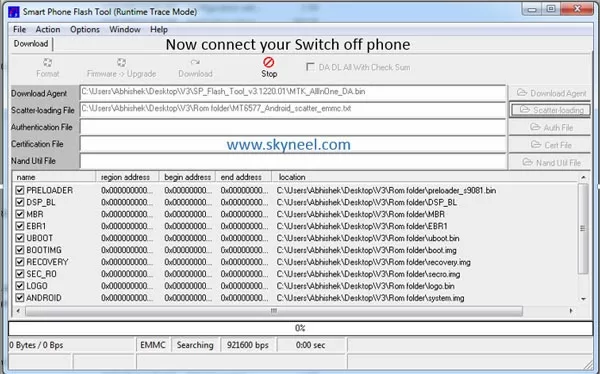
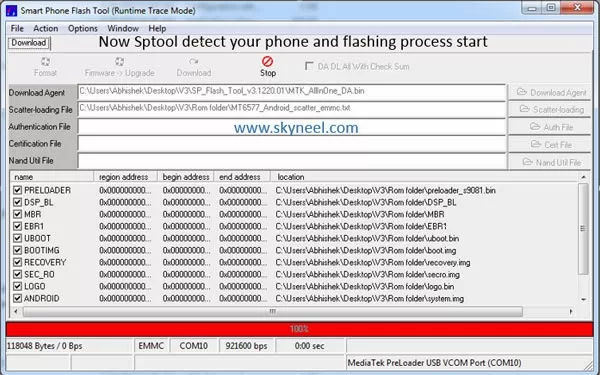
Step 8: SP Tool detect your phone and process will start. If Sptool is not recognize/detect your phone then install vcom driver read this post it will help you click here (Driver already in phone flash drive if you don’t have these drivers then install it)
Step 9: Now start downloading Stock Rom in your phone by flashing
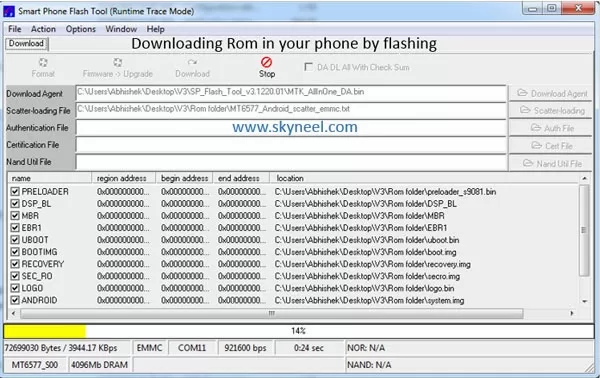
Note: – Don’t interrupt this process as it can potentially brick your device. Make sure no power interruption takes place.
Step 10: After the process complete, a green ring will appear.
✅ Must Read: How to Spin Text in Microsoft Excel
📌 Also Read: Tips to protect your eyes when using the Smartphone
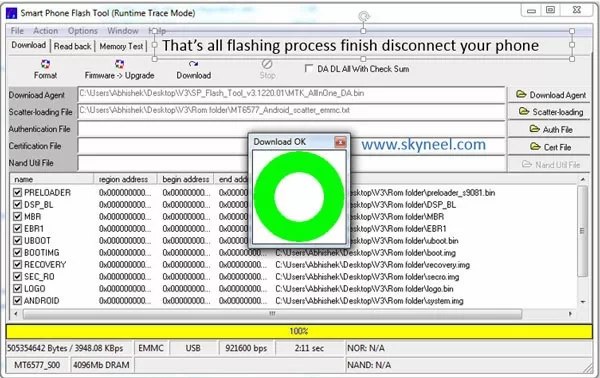
Step 11: Disconnect your phone. Now your phone is updated.
Must Read: Tips of Hidden Secret Codes For Your Android Mobile
After update you can root you Canvas Turbo because root allows for you to use a maximum of your phone without any restrictions.After root you will install custom apps, custom Rom and custom setting in your phone.But first read Root Advantage and Disadvantage by this post then follow these guides “How to Root Micromax A250 Canvas Turbo and Install CWM recovery in Micromax A250 Canvas Turbo” .
Earlier updates: –
Micromax A250 Canvas Turbo Stock Rom V1
Micromax A250 Canvas Turbo Stock Rom V2
Micromax A250 Canvas Turbo Stock Rom V3
Micromax A250 Canvas Turbo Stock Rom V4
Note: I am not responsible if you make Mistakes and Bricked Devices.
how to know if my phone is detected by sp tool or not?? got stuck on step 8. :( Please help…
Hi
When your PC detect your phone, you will see comport in SP Tool and Flashing process will start.
Install missing driver and and as soon as phone connected the red line will show there at bottom.
is there a chance of losing my IMEI no. in the updation?
Ur imei will be definitely lost after the process. U must backup ur imei with mobile uncle tool.
my mmx a250 gon blank not even switch on during flash increase intrnal storage with software mtk plz hlp me
d
What is the use of updating to this version? Can you please explain in brief?
I am also searching for that
Working
Is vector working?