Micromax Released new update Stock Rom V2 of Micromax A110Q Canvas 2 Plus. Here is a safe and easy step by step tutorial to install or flash new update of Micromax A110Q Stock Rom V2. Micromax will release Android 4.4 Kit-Kat update for Micromax Canvas plus soon.
This is the first update of Micromax A110Q Canvas 2 Plus. Micromax release stock Rom V2 for this phone. It is superb phone from Micromax. This phone has a quad-core 1.2 GHz processor along with 1GB of RAM, 4GB inbuilt memory and 4.2 Android Jelly Bean. This update makes changes in software & improves hardware performance of Micromax A110Q Canvas 2 Plus.
Must Read:How to improve Android Smartphone battery life with 7 tips
Preparation of flash or update:
1. Take a backup of your phone Click here.
2. Your phone battery should charge 80% minimum.
3. Make sure proper power backup of your PC.
4. Read all steps then do it careful.
Download ROM and Tools of Micromax A110Q Canvas 2 Plus:
| File Name | Download link |
|---|---|
| Micromax A110Q Canvas 2 Plus Stock Rom V2 | Download |
| Micromax A110Q Canvas 2 Plus SP Tool v3.1312.0.139 | Download |
| Micromax A110Q Canvas 2 Plus USB Driver | Download |
Steps to install or flash new update of Micromax A110Q Canvas 2 Plus Stock Rom V2:
Step 1: Install drivers in your PC (If you feel any problem in install driver and Enable USB Debugging on your Phone. Go to Settings >>> Developer options >>> USB debugging check it ( If your phone have Android 4.2 or upper version then see how to enable Developer options here is guide of this Click here). After then switch off your phone.
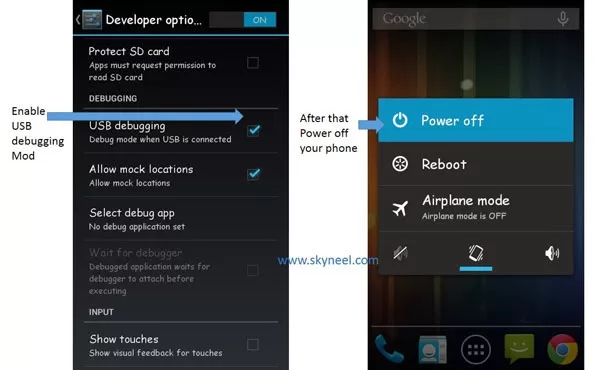
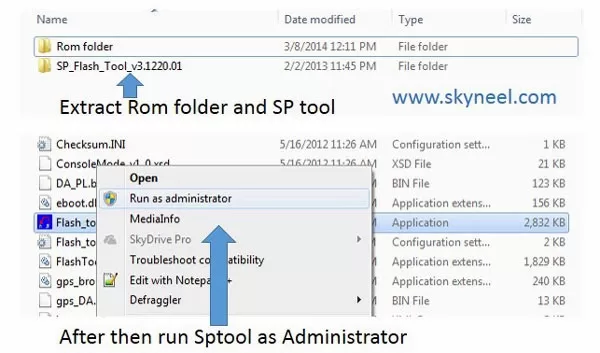
Step 2: Extract the Stock ROM folder where you want then Extract and open the SP Tool. and run Sptool.exe Run as Administrator
Step 3: You will see an SP tool window, now click on the scatter-Loading option in the SP tool. Then you will get the new tab of SP Tool which you ask the location of the scatter file on your PC. You will find this scatter file in the extracted Stock ROM folder. Now go to the Rom folder and select the file “Android_scatter_emmc.txt”. See in this image.
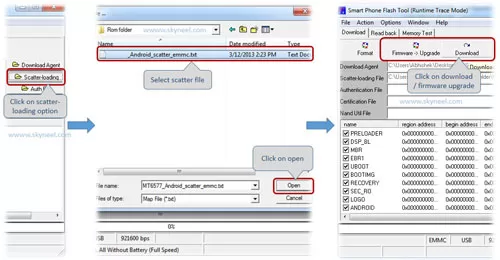
Step 4: Now You will see two options for flashing Rom, first is “firmware upgrade” option which is used to update or flash your Rom without deleting your data and second one is “Download” option this is work for format your phone then flash Stock Rom ( like fresh Rom installation). So choose according to your requirement and I suggest, click on the “Download” option and flash fresh Rom on your phone.
Step 5: Now connect your switch off phone to the PC via USB cable (Make sure your phone is switched off). SP Tool detect your phone and process will start. See in blow image. If Sptool is not recognize/detect your phone then install vcom driver read this post it will help you click here (Driver already in phone flash drive if you don’t have these drivers then install it)
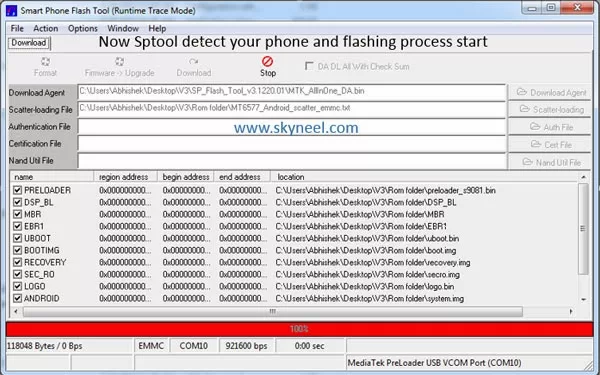
Step 6: Now Sptool start downloading Stock Rom in your phone by flashing.
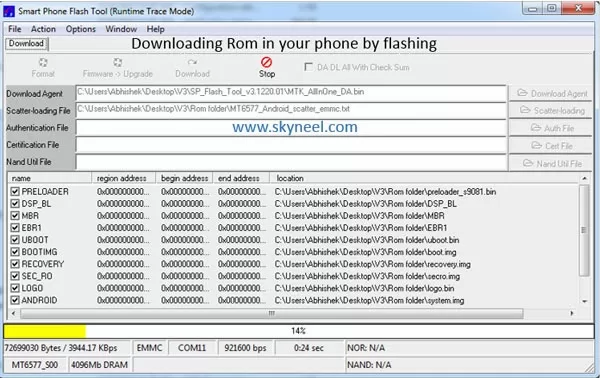
Note: Don’t interrupt this process as it can potentially brick your device. Make sure no power interruption takes place.
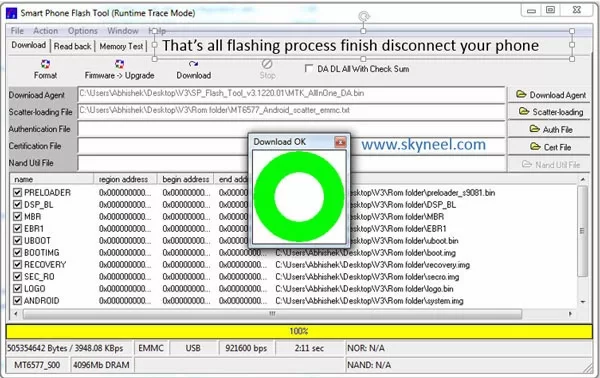
Step 7: After the process complete, a green ring will appear.
💡 You might like: No cells were found Error with Easy Solution in Excel
👉 Don't miss: Best Hidden iOS 14 features, you must have to know
Step 8: Disconnect your phone. Now your phone is updated.
Must Read:How to get read or write permission in Android phone
After update you can Root Canvas plus, because root allows for you to use a maximum of your phone without any restrictions. After root you will install custom apps, custom Rom and custom setting in your phone. but first you need to read Root Advantage and Disadvantage then follow root guide “How to Root Micromax A110Q Canvas Plus ” by this post.
New update of Micromax A110Q Canvas 2 Plus:
Micromax A110Q Canvas 2 Plus Stock Rom V3
Note: I am not responsible if you make Mistakes and Bricked Devices.
Sir mera mmx a110q mobile charging show kr rha but battery charge nhi ho rhi (battery % nhi increase ho rha) mene charger and battery charge krk dekhi problem same h. Sometimes mobile charge hota h fir same problem aa jati h.
Charging socket check krwaya service center se usme problem nhi h.
Sir mere mobile me kon c problem h mujhe bataye.
iC problem to ho sakti h kya ye?
Thanks sir for help
BHAI TRY THIS FIRST OF ALL SWITCH OFF UR PHONE
THEN PLUG IN UR CHARGER
THEN WHILE THE CHARGER IS PLUGGED IN PHONE HOLD UR POWER BUTTON UPTO 2-3 MIN AND THEN U WILL OBSERVE UR PHONE BLINKING WITH CHARGING LOGO ON IT
TRY AND THEN THE ERROR IS FIXED AGAR NA HO TO PHIR TRY KRE
i lost my iemi no….
plz…. hlp….its saying invalid iemi no.
:/
i have Qmobiel a10 Quadcore and i flash micro manx rom on i plz reply
Hi I have qmobile noir a900 after rooting I install recovery image from mtk mobile uncle tools after that phone not on and no go into recovery mood. Kindly help fawan69@gmail.com
HI Farrukh
install your Stock Rom
hi abhinav
V2 is latest update till now and Kitkat 4.4 update for micromax a110Q coming soon
hi sir i get an error like nvram i flashd v1 again bt stil roblem persists and do u sugest to move to v2 stock or is there a stock 3 cmg soon
hello brother, when i lock my screen, the light keeps on in background for some time. and after it goes off screen does not turn on until i restart my phone.. i think i have a problem with uboot.bin file
can you please help me out!!
HI Aryaj
Copy uboot.bin from v1 to replace with V2 folder then flash. If it is uboot.bin file problem then resolve it.
Good day
Thank u Sir, But i have fear that, when they test my mobile then will they come to know that i rooted my mob. and also i flashed roms and all? anywhere in IC or motherboard it records how many times the firmware and rom have flashed…? Or they just service my mob and give it back to me know.??
don't worry root your Mobile
if you will face any problem in your phone then flash your stock Rom then go service center
after flash erase all record
dad set hai only rad bati ati hai
First recharge your phone battery minimum 80% and install vcom driver in your PC then follow these steps and flash your stock Rom
Good luck
pls reply Sir, even in engineer mode its displaying as At command send failed…
Hi Sridhar
Read this post it may help you click here
Thanks for ur quick reply Sir, I tried all these, i nearly spent 8 to 10 hours infront of my mob n Lap. nothing worked. anyhow i flashed stock rom and got back warranty and i've given my mob to MMX care……. Lets see what they do.
Sridhar you took right decision,
Good luck
Hi Sir, I made partition as in XDA thread. after that i flashed colour rom. its now showing IMEI is invalid. I used all methods like mobile uncle and Permanent IMEI writer in XDA thread. even no use. getting same problem. I have IMEI backup in SDcard using mobileUncle app. its restoring but after reboot the same invalid IMEI problem. what i have to do now.? pls Pls pls pls help me.
"S9086B_MP_F2F3F8_B1_IN_MMX_16
is this is v2 or v1??
and what is rooting??
i didn't find any rooting explorer in my file manager!!!
how to find that??
this is v2 Rom
Read this post and root your phone click here
How i can update jelly bean to kit kat in a110q ??
it is depend on Micromax, When Micromax Release KitKat update for A110Q then i will post on this blog. So join us on Facebook and Google plus. Stay with us.
Hi,
I have some issue regarding the IMEI saying"invalid IMEI", i tried the enginerring mode using the *#*#3636633#*#* concept, but not working, Baseband is showing unknown and sim is not detecting, any suggestion for this, pl help
Since engineer mode is not working, i flashed v1 rom from your link, but same status, even after flashing, the imei is not working, engineer mode not working, What should i do?
sorry it is *#*#3646633#*#*
contact service center
how 2 instal driver in my phone they are showing mtp65xx is not found
Hi Shubham
install Driver in your PC, not in your phone
@arvind hingonia the rom you want to flash in a110q is for a116 that not work on a110q.
@arvind hingonia do you want to brick your phone brother plz dont use any other phone drivers/rom on a110q.
i want to install samsung S4 rom in micromax A110Q …..how can do it….recovery mode does not show after off mode press vol ,vol-,and power swith…
Hi Arvind
Zubair is right. if Samsung S4 ROM is ported for Micromax A110Q then install other wise don't install.
My suggestion is use always stock Rom and Root your phone and install your custom app and setting
please link me for mobistel_cynus_t1_drivers_x64
@Arvind Hingonia
Make sure that you dont select normal mode use volume + button to move and volume – to select recovery mode first canvas logo shown after that you go in recovery mode
NOTE:
A116_CHD_S4 rom is not for canvas 2+ so dont flash it.
recovery mode shows these option …recovery…..mode
fastboot…..mode
normal…….mode
when i choose recovery mode …..mobile starts in normal mode
RECOVERY MODE:VOL UP
you phone is rooted or not?
is –A116_CHD_S4 Rom for Micromax A110Q?
SWITCH OFF करने के बाद VOL +,VOL-,व POWER SWITCH को दबाने के बाद ये OPTION आते है —-RECOVERY MODE:VOL UP
FACTORY MODE:VOL DOWN
what i do
i want install –A116_CHD_S4 rom……my problem is MT6589_Android_scatter_emmc ….in not in this rom
copy your Rom in your SD
then switch off your phone
Go to recovery and install your rom
or sony or htc rom
Hi arvind
we are lucky because Micromax Not much modify Android Rom. we are using real android version which develop by Google. In Samsung and Sony Mobile they make hues changes in the Android.
It is your choice but i love Android
example : – menu screen is black i thing you don't like it but it is reduce battery consumption and perform fast etc.
i love Android because Google make best for us
what is your mobile number ……i want to contact with u…..
Use contact us page click here
मेरे पास MICROMAX A110Q MOBILE है मेने इसे ROOT कर लिया है लेकिन V2 ROM INSTALL नही हो रहा है SWITCH OFF करने के बाद VOL +,VOL-,व POWER SWITCH को दबाने के बाद ये OPTION आते है —-RECOVERY MODE:VOL UP
FACTORY MODE:VOL DOWN
Please help me…..fast
do not use recovery
follow these steps for install v2
कौनसे steps , please tell me about that
Follow these steps to Install stock Rom V2:-
1. Install Drivers (driver in your phone)
2. Download and Extract SP tool & Micromax Stock Rom V2 folder. Open Sp Tool folder and click & Rum sptool.exe Run as Administrator if you are using Windows vista/7/8
3. Select ' MT6589_Android_scatter_emmc.txt file inside the ROM folder.
4. Now Switch off Canvas 2 Plus.
5. Click Download Button in Sp tool.
6. Connect Phone {Switched off} to PC via USB Cable.
7. If every things right, flashing will precede
8. Wait till it finishes….. A green ring is displayed on completion.
9. Now Close SP tool….. Remove Phone from PC.
10. Switch ON the phone…It is successfully Flashed…
SP TOOLS SHOW all files checked withiut path…..please tell me about this problem
MT6589_Android_scatter_emmc
मेरे ROM मे यह नही है मुझे इसका LINK दो PLEASE SIR
I HAVE 2 ROM ,
1–A116_CHD_S4
2–MIUI_V5 इनसे काम चल जायेगा ?
Arvind both are custom Rom.
and i don't suggest you to install
i am always suggest install only stock Rom
install Micromax stock Rom V2
I Want to install samsung rom….
Done.
Thanks bro you and your site is really helpfull.
welcome
join us on Facebook and Google +
Wow you are too fast bro yes my cwm recovery is working but i dont have any rom so thats why can i flash any custom rom to unbrick my device because you say that flashing stock rom through cwm not possible
if you out of town then download any custom Rom and flash with custom recovery.
and when will you come in your home then flash stock Rom
Sorry bro not able to use reply function using my old nokia n73 to post here
my problem
yesterday i tried fastboot but my phone stucked none of keys work so i remove battery and then put battery again and when i tried to switch on it stucked on boot logo ending i can try everything
factory reset
restoring nandroid backup but nothing work.
ok
solution of this problem : – flash your Rom again
is your CMW recovery working ?
1 more thing if i flash any custom roms for a110q then it will unbrick my device or only stock rom unbrick
I accidently bricked my phone and i am out of town now so cant have any pc here so thats why i ask.
what do you thing about bricked
in my knowledge phone not start
I accidently bricked my phone and i am out of town now so cant have any pc here so thats why i ask.
Is this possible to flash this stock rom using cwm
no, but why you want to flash stock Rom by CWM
hey what abt rooting for ths ROM ??? old tools not supported rooting
Not new to Android still rooting problem
what to do…..??
thanks
read this post click here and follow these steps for root your phone
while extracting it show an error that system.img is corrupt.
how to fix this bug??
hi harish
use internet download manager for download this Rom
micromax mobile skype outgoing voice problem, pls suggest what to do?
did you try any other app like hangout etc.?
dose your problem same?
abhishek ji
i am using micromax A110q canvas plus 2
i had a setting in my phone "vibrate when outgoing call received"
now i am unable to find it……………….kindly help me
my no. is 9971702909
ok i try to find if i will get then post so stay with us
and join us on Facebook and Google +
abhishek ji
i am using micromax A110q canvas plus 2
i had a setting in my phone "vibrate when outgoing call received"
now i am unable to find it……………….kindly help me
my no. is 9971702909
I have tried all the steps carefully,
But my phone not detects on PC.
Any solution.,
Can i update its version from Micromax Center in FREE ????
hi rahul
install vcom driver then connect your phone
download vcom driver from this post click here
how to install vcom driver click here
yes you can update this version from Micromax Center in FREE but they take time
For Installing Stock Rom V2 the first step you mentioned is Install Driver (Driver from Phone), how to install that, I connected phone to Laptop but I did not find any Driver to install
find in your flash drive
if you not find then install these driver click here
Micromax phone update via flashing Rom
Hi, GPS is turning on Automatically on my A110Q, what could be the reason?
take a backup of your phone then reset your mobile
Unable to root A110q after installing V2…. tried mediatek toolkit also
read this past it will help you click here
Hmmm
I used V2 and V1 but V2 not working properly so better use V1
No doubt Micromax A110Q is outstanding phone, i thing Micromax will Release new Rom update for micromax A110Q soon. wait for it. if Micromax will Release then this blog will inform your, So subscribe us or join us on Facebook and Google +
how to downgrade it to v1. Can it be downgraded by formatting
read this post to flash V1 in Micromax A110Q click here
i installed font package in ma phone it makes ma phone bricked so plz help me to recover this is flashing will help to recover this problem am using canvas a110q
recharge your phone battery then reflash your Rom
don't worry
Thnx abhi for new link.
But ROM V2 have lot of bugs!!
tell me i try to fix them
hey plz give me also the new link
why are you want new link?
It is working well
abhishek!!!
this rom file is not extract…error
now Micromax A110Q new link is working
abhishek!!!
this rom file is not extract…error
abhishekji,
my handset outgoing voice is very low.
please give solution for it.
with regards
thanks in advance
use Engineering Mode read this post click here
Can i use it on QMobile A900 which has 4.7 inch screen i think thats the only difference and other is looks between these two sets. I bricked mine its not restoring cwm backup it get error on system restore. Plz guide me.
abhishekji,
my handset outgoing voice is very low.
please give solution for it.
with regards
thanks in advance
abhishekji,
my handset outgoing voice is very low.
please give solution for it.
with regards
thanks in advance
abhishekji,
my handset outgoing voice is very low.
please give solution for it.
with regards
thanks in advance
Not working
Stock rom V2 zip file is corrupted not extert help!!
maybe it is not downloaded full file because i am trying it now it work swell
download again
i m not able to use USB INTERNET option on a110q.
i.e to share windows pc internet via usb cable.
it says connected bot not able to use internet
i am not sure but try otg cable and USB dongle
will it affect my warranty
no warranty issue becouse it is Micromax release
where is the official source page for this upgrade?
I have purchased my c2 yesterday … how do i know I am on v1 or v2?
Plz reply
go to setting and check it is 16 or 12 "S9086B_MP_F2F3F8_B1_IN_MMX_16"
i have 12 at last so it v1 or v2
if you have 12 then it is v1
I have heard that V2 is very buggy…….does it was more buggy than v1……..any info about update for a110Q frm mmx.
try it
does flashing V2 voids warranty?
no, it is Micromax release
Should i update my A110Q to V2………? i heard that it hv bugs what should i do………can i roll back to v1 after installing v2?………does flashing v2 requires any rooting….?
yes you Should try V2 Rom
because very simple to back on V1
Which one is better for A110Q…………V1 or V2 rom??
obviously V2 it is update version
Installed and used V2 ROM.. But in V2 Playstore is NOT connecting, rolled back to V1.. any solutions??
Akshat can u tell me this V2 working fine!! Or not ?
fine
Dear Sir by doing this method tool doesn't recognize my phone and process doesn't start…pls give me more detailed instructions or any solution…….tnx in Advance…..
carefuly do these steps
first Select ' MT6589_Android_scatter_emmc.txt file inside the ROM folder.
then Now Switch off Canvas 2 Plus.
Click Download Button in Sp tool. then after
Connect Phone {Switched off} to PC via USB Cable.
if not recognize then remove phone battery then put it again
after that once again connect you phone
i think it is work for you
good day
i did this also but the same result…..any help….
reset your phone then connect try this
if it not work then do this
1. connect your phone to PC
2. click on USB mode
3. after that switch off your phone
4. do not disconnect your phone
5. after few second start recharge your phone
6. then click download in SPtool
7. disconnect your phone and reconnect
8. after few second detect your phone process will start
good day
i did these all steps brother but still same problem.i'm not newbie to android.i have experience in android,but in this phone even for rooting also having trouble….anyhow tnx for ur help…..
ok
i will search about your problem, may be i will get solution.
Tnx bro waiting for ur reply………
Click the downlaod button and then switch off ur phone.
after switching off a red LED will glow indicating charging..
Press and Hold the power button until SP Flash Tool Recognizes you device and starts downloading.
Immidiately release the power button