Hello friends, This is a easy guide for take a backup and restore data of Micromax A110 and Android phone. At present time most of the mobile manufacturer companies launch budgeted smartphone which comes with different great features and latest technology.
Now, today we have to discuss about the latest technology smartphone which is developed and launched by the Samsung company which release his latest technology smartphone which is developed by the top most Indian mobile manufacturer company with the name of Micromax A110.
There are lot of time we lost all important data of our smartphone due to many reasons if you will be familiar about the backup/restore feature then there is no need to worry but if you don’t known then you must lost your all important data. So, today we have to discuss a safe, simple and easy step by step tutorial to take backup and restore data of Micromax A110 via Stock Recovery Mode. Today we will know how to take Backup of Micromax A110 and other Micromax mobile by Stock Rom Recovery Mode. We try to make this process easy by step to step with image guide.
Must Read: How to remove or disable bloatware on Android device without Root
Easy steps to take backup and restore data of Micromax A110 and Android phone:
1. Power off your phone.
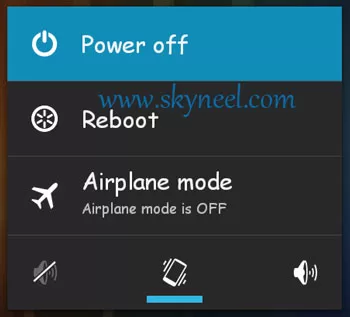
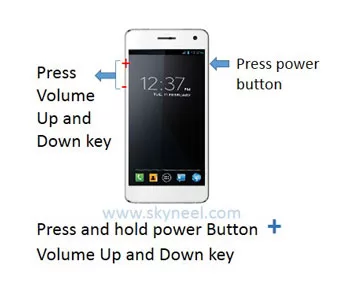
2. Press volume up and Down key + Power button at the same time unit appear recovery mode option.
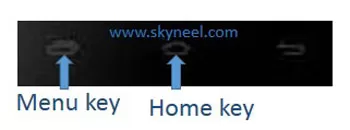
3. Press Home key and then you will find lots of option of your phone.
4. Select the 6th option for backup of your data by press volume down key then press menu key for enter
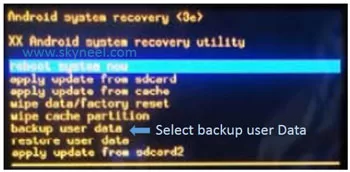
5. Select the 7th option for restore of your data by press volume down key then press menu key for enter
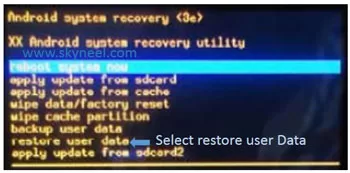
After press menu key then backup/restore data process start
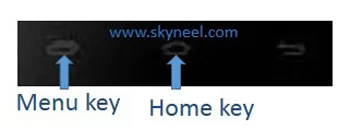
📌 Also Read: How to enable or use battery saver mode Android phone
💡 You might like: How to count total White Spaces in Text String MS Excel
6. After complete select reboot system option by press volume down and press menu key
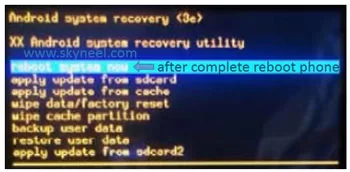
Must Read: How to fix charging problem in the Smartphone
I hope you like this backup and restore data of Micromax A110 guide from which you will be able to easily take a backup and restore data of Android phone without any extra efforts. If feel any problem in this guide then please use comment box. Thanks to all.
hi sir i forgot my pattern of my micromax mobile i dont have any backup can you suggest me a way how to unlock my phone without loosing my data?
Hi Sai
Unlock your phone by Android Device Manager app.
My play store is delete .
what i do the play store reinstall ?
Reset your phn
HI,
I WANT TO UPDATE VERSION IN CANVAS 4 (A210)
KINDLY SUGGEST ME.
Hi Swapnil
Here is last update of your phone Micromax CANVAS 4
I have downloaded miui 6 from on a120…after flashing the phone get strucked… Showing MIUI6 … What can I do now…
Hi Laxman
Flash your Stock Rom. You can find your all stock Rom with guide here.
mx unite 2 A106(rooted)
wanna flash custom rom..
give me the best rom &instructions
plzzzz
Hi Bala
if your phone is 3g phone then you can change your phone network and if your phone is 4g phone then it was already set on 4G recommended and also you can change it manually by Mobile Network.
My phone 3g …plz ,4g canwd
What are steps we should follow before flashing rom in order not to lost IMEI number of phone…
Last time i flash rom on my old android phone and its imei number vanished and the phone doesnt read sim card
Hi Rohit
If you are updating your phone then you will not lose your IMEI number. When we are try flash fresh installation then some phone lost their IMEI number. So use only firmware update option.
my rooted canvas fire 4 play store not connecting to internet and shows google play service stoped working
Hi
Try this, it will work for you : Solution when Google Play Store is not working properly
How can delete my mobile datas,contacts etc..before selling phone
Hi Vimal
reset your phone, here is guide Factory reset Android device by System Settings or Recovery Mode
is it safe to root micromax a350?
is it possible to repair bricked phone and can u please suggest an easier method for rooting ?
Hi Yajurved
yes you can unbrick your phone by flashing stock Rom. Root is also safe and here is root guide: How to root Kitkat version of Micromax A350 Canvas Knight
hai i have some problem with my micromax a110 that it is not charging at all even after 10 hrs of charging its showing 1! % charge
Hi
here is guide to solve charging problem: How to fix charging problem in the Smartphone problem:
I need to root my micromax a120 please help me
Hi
Here is root guide: Root and install CWM recovery on KitKat of Micromax A120 Color
Hello sir i want to know that after installing custom rom on my device then will i can install apps by sharing or by installing from google play as usual or will i have to use any othet method to install apps
Hi Gursimran
Google play store work on custom Rom but I give you a suggest for custom Rom. Don’t install custom Rom on your phone, because custom Rom means, Beginning of troubles in your phone.
How to take backup of full data of Micromax canvas 2 colours a120 if recovery mod method not working
Hi vipin
use backup app from Google play store
I have some problems in my micromax a114 when internet connection on the following will appear on the screen and hang the mob :-
1. Unfortunately, TimeService has sopped.
2. Unfortunately, Android system has sopped.
3. ikeyboard has stopped.
And also when minimize the screen. The following will be available on the screen with android logo :-
1. adobe air
2 android system.
3. security pluging
4. com.android ptika4
Please tell me how to resolve it…
Hi Vikas
Flash stock Rom, here is guide: New update of Micromax A114 Canvas 2.2 stock Rom V3
Hello vikas I am also using same mobile and I am also face same problem to resolve this problem first restart your phone then go to settings then goto apps then touch on all applications then scroll down uninstall time service security plugin, adobe air. And then install no root firewall and select these applications do not access the internet if again these applications access internet then automatically installed and cause hanging of mobile
I have to root my vivo y 15 . please suggest in easy and safe steps. plz plz plz
Hi
Here is root guide for Vivo Y15: How to root Vivo Y15
Plz tell me…
micromax Canvas Elanza A93 can be updated or not ?
Hi, Tushar
It can be update and we will provide new update of your phone very soon.
thanx…
How long I have to wait for this?
Sir .
Micromax canvas a350
How to root and update to lollipop
Sir plz.
Where I ur shop in hyd .
Plz tell
Hi Sohail
Here is root guide: How to root Kitkat version of Micromax A350 Canvas Knight
And micromax didn’t release Lollipop for Micromax canvas a350.
Hiiiii
sir i forgot the pattern of micromax and in that i have my data in internal memory to secure this i made my data from the recovery mode
now want to reset it and want my data is it possible to get back after reset it
Hi Nishant
first of all take a backup of your Data via recovery mode on the SD card then flash stock Rom or reset. Then after boot in normal mode and switch off your phone and restore your backup via recovery mode.
How much time it take to backup the data in recovery mode
Hi
It take 10-15 min to backup the data.
haiii sir ihave the micromax A35 bolt mobile can u tell me how to increase my internal memory it is worked on android 2.3.4 version
Hi
Here is guide to increase my internal memory
1. How to swap internal storage with the SD card in Android device
2. How to increase internal memory of Android smartphone
3. Increase internal memory in Android Mobiles in easy steps
Sir I hv canvas a77. When m making backup for install custom rom it get stuck and recovery option is not opening in bootloader. Pls help me
Hi
Install new update New update of Micromax A77 Canvas Juice stock Rom V3
sir,
i have micromax canvas turbo a250 and i have lots of problems in my phone
– my phone automatically gets switch off and restart
– my phone hangs many time in a day
– phone gets over heated
– if i use with double sim one sim automatically deactivated
– many time it dont allow to use camera
many time i reset my phone
please tell me what should i do?
Hi
Install new update of your Phone, here is guide: How to update Micromax A250 Turbo with New Stock Rom V5
Hi. I have MICROMAX Canvas SELFIE LENCE Q345 but I can not connect it with a OTG. Help me please.
hi.. i have a canvas a114 … it stuck in booting n dn not open recovery mode.
Hi
Flash your Stock Rom. Here is guide: New update of Micromax A114 Canvas 2.2 stock Rom V3
bro…my lenovo a880 suddenly will off after i turn on…hav to turn on again and again ….how to fix it
try to reset your phone by recovery. If it is not work then install your stock Rom.
How to root mmx a120 4.4.2 8gb
Hi
Here is root guide of Micromax A120 Kitkat: Root and install CWM recovery on KitKat on Micromax A120 Color
When i followed your back up instructions i found no comond why it was. And i can't done .please tell me what i do
tap on Home or menu key
Sir,
i have a problem with my micromax canvas 2.2
whenever i have make a call my phone is switched off automatically. Please guide me ASAP.
Thanks & Regards
Pankaj Sharma
Hi
Try to rest your phone, if you face this issue again after rest then, flash your stock ROM.
bro i have canvas 4…and its unfortunately dead
so please any Option to get back my phone please suggest me
Hi Ankur
Don't worry, Here is guide to install stock ROM on your phone Stock Rom of Canvas 4 click here
but first of all recharge your phone battery and install USB driver on your PC
Sir
I have taken back up it creates userdata_*.backup" file in my SD card.
How i can take data (messages / Contacts/ etc…) from date file or how i can restore data from backup file ??
Vikas
micromax A116 Setting not Open
sir i fomatmicromax unite2 a106 phon ok but invelid imei plz help me sir ji
sir i fomatmicromax unite2 a106 phon ok but invelid imei plz help me sir ji
Hi sir i am a micromax user(a210 model). Recently i have flashed a custom rom to my mobile using CWM and i have taken backup(so i have both user_* .backup file and the backup file created from CWM). But now suddenly all i have some display related problem i have tried every thing like flashing the stock rom again etc but no luck. Now i have decide to give my mobile to service center so obviously i have to remove that CWM and get back to my stock recovery. I have downloaded number of stock recovery image files and flashed it using mobile uncle tools but still when i move to recovery mode the CWM only appears. Please help me to over come this problem. I have visited number of websites(including XDA-developers) but nobody faced this problem in past so i found no solution and i hope you will help me.
Thank You.
Sir my phone pattern is locked and i dunno the user name and password.I need to backup my contacts.Its very important,Please help me #mirco max HD
Hi
Do you sync your contact with your gmail?
when i do "reboot system now" then my menu key is not working. only volume up & down key working :( what i do?
i have rooted canvas a88 and also installed cwm recovery using sp flash tool .
everything works fine .., but when i try to get into recovery mode by pressing vol + up + vol – down and enter into recovery mode . it shows white blank screen and i cannot boot into recovery mode .
plzz help
All i want is rooting and flashing custom recovery on my phone
Hi Jaidev
I don't suggest you to install any custom Rom because custom Rom means, Beginning of troubles in your phone.
and here is root guide for your phone click here
Thanks Abhishek. It is done.
1. I came to know cynogenmod rom is very popular. Do you have any experience of cynogenmod rom on mmx c2+ stock v2. Will it be safe?
2. One more thing, do you know method of rooting Gionee pioneer p3.
for rooting my device, While flashing custom recovery on my mmx c2+ stock v2 through flash tool, after greeni circle i find message that your phone will have booting problem.
Hi sir, My Mmx canvas 2.2 cell is not working. I can switch on it but it only stays on canvas logo. I have rooted my cell to change the fonts during the change of the fonts my cell got hanged suddenly and switched off. I tried to switch on it and it got on but stays only on canvas logo. Kindly help me out.
Hi Vinay
Flash your stock Rom here is guide for you Click here
Hi sir, I m using Micromax Canvas 2plus, I have cleared data from contact storage without knowledge, my all contacts gone, will you pls inform me how can I restore it
Hi
If you were select all option of Google account then check your contacts on gmail.
my mobile lock with pattern lock i gave backup and update cwm recovery mode but cannot restore it by this recovery because .backup file not supported with cwm recovery and i return to stock recovery so pattern lock again what to do please help me guys……
Flash your phone by your Stock Rom
after flash my phone return to restore my mobile with pattern lock what option for that
How I may root my Micromax A106 phone? Can you refer to a guide? Thanks in advance …
Hi Manas
ok I will post root guide for Micromax A106 phone
Namaste all,
my micro max a110 set not loading, stuck at canvas 2 logo
i have not taken any kind of backup so far, i need data before factory reset, plz suggest all possible ways
note : charging connector is not working properly.
so i m using cell phone by changing battery and charging them by
battery charger.
i have not rooted or installed any rooting softwares,
i m general common man, i dont know all those
i tell u, what all i did so far, plz help me further.
i went to recovery mode,
it was showing options, to restart
load from sd card, sd card 1, from cache
erase data/formate,
backup and restore options
out of them i have choosen backup user data,
it started to show below message :
sd card free space 187mb
user data allocated 748mb
SD card did not have enough free space.
i really dont know what to do now, plz suggest me possible ways
i must need data, plz help me what to do.
Hi Guru
flash Stock Rom on your phone, here is guide click here
pls advise me how to take back up of data in recovery mode,
it says insufficient storage space.
without backup i cant go for factory reset as it will erase all my contacts which i dont want to loose. pls guide me.
read this guide click here
hey i ve rooted my phone canvas 2 officialy running on jelly bean and installed custom rom lewa before installing i've created a backup (userbackup….309mb) file and now i want to restore it….plz help!!
how to open micromax a110q afte doing root also it does nt opens
only
Hi abishek, when i get into the recovery for backup user data, it shows no command. Pls help me.
hi abhishek
how can i root my micromax a88 canvas music
Hi Mayand
Here is root guide for Canvas Music A88 click here
Hey i rooted my micromax a88 but when i enter the recovery mode it appear only white plz help…
Please explain your phone problem, I don't understand
sir you mentioned that 'press ENTER key for backup.my phone is micromax a92 canvas lite.which is the enter key here.please tell me
Hi Thomaskuttyy T P
use menu key for Enter
Hi Bro,I am buying a new handset,How i can take backup of my sms,contacts number and som important files from my Micromax canvas 2 handset
Read this post click here click here click here
Hi Bro,I am buying a new handset,How i can take backup of my sms,contacts number and som important files from my Micromax canvas 2 handset
Bro i want update android version..
How can i gat that
Hi Abhijeet
Here is tutarial of update android version in A110 click here
My menu button is not working in recovery mode….but it is working in normal mode
use TWRP touch recovery. you can find WRP touch recovery on my blog also
so where exactly is the backup of the mobile data saved??
Hi Vikku
Backup save in your Internal SD card
so is my rom backed up too??
No its take your data backup only
If you want your Rom backup then root your phone and install custom recovery after then take backup. which is your phone model number tell me, i will give you guide of root and install custom recovery in your phone.
bro am using canvas a110 mobile even aftr delting data am getting it again…even aftr am having 2 gb memory available in xtrenal memory .am unable download or share pics in wats app,and even i cant format the external sd card directly frm phne…even connecting wid laptop and formatting da memory card bt still am getting those files…plzz help me…hw to get rid of these
use root explorer like app then delete
hi
i am trying to take the back up of the phone but it isnt working
when i click the menu button after selecting the backup user data…nothing happens…the menu key and the home key are not working anymore
i have micromax a116
please tell me what to do
deeksha juneja
use Up and Down key for select your option and power button for enter
when it show a pic like mention in this post then use menu key for option
thanks a lot guys u saved my phone
welcome
Join us on Facebook and Google plus for our new updates and posts
hi,
i tried to backup my canvas HD
like u said i went to recovery mode but then when i press home key nothing appears
the screen shot in step 3 only appears and it doesn't go any further.
plssss help.
Hi Prathish
Press vol. + and – ket with power button
then your will see two option choose recovery mode
after then choose 6th option backup user data by pressing vol down key
then click on menu button not home key
after backup reboot your phone
that's all
i tried menu button too!!
but it doesn't go any further.
it just shows the screenshot in step 3
in step 3 u have told to press home key to get into software update model even that doesn't work for me..
if you want full back of your phone then root your mobile
and take backup by CMW recovery. here is tutorials click here
Buddy , my phone's touch screen stopped working (including the home, menu and back keys), i want to back up my contacts and other important data's before handing it over to the service centre. How can i do that..?
and by the way do u have any idea how it stopped working..? it did get any physical damage, it was just kept in my pocket and when i took it out to recieve a call, i couldnt! please help me out! :(
ok if your power and volume button is working then you will take your backup of your phone.
Go to recovery then take your phone backup, follow these instruction and connect your phone to PC then copy your phone backup in PC
Hey abhishek, I am going to update android to jelly bean and want to ask you that if I backup all the data before updating then will I be able to get that same data back after updating…..??
yes you will take backup then update and after update restore your backup
Hey abhishek,
I am going to update android to jelly bean and want to ask you that if I backup all the data before updating then will I be able to get that same data back after updating…..??
simply how to take backup when phone is in off condition.
reset phone feature is not delete internal and external SD card data
Hi PHC
open your mobile sd card in your PC via usb calbe
if you want to use PC suite then read this pos click here
but the pc Suite requires to get the cellphone in on condition. which i cant do.
My canvas A110 is now getting on. So i want to reset it. But before resetting it i want to take backup in my sdcard. And now its showing low space in sdcard and cant get it on for use with PCSuite. So plz do reply. What i am to do to make my data safe.
What if we update the software after the backup??? Does the restore option works to get us our data back?
yes
It doesn't i updated to Jelly Bean from ICS and now while restoring it shows checksum Error
did you update your phone with jelly bean?
how can i root my canvas 2
Read this post click here
Hi Abhishek, Thanks for the tutorial. I am having a Micromax Canvas HD model and it got locked due to many wrong pattern attempts. My Internet Connection, Wifi, etc. was off before getting locked, so the only option was there for me to do factory reset the phone. So before doing that, I made one backup file by using "backup option" when we press +/- volume keys & power button at the same time. The backup filename is something "userdata_*.backup".
Now, after done with the phone reset when I tried to restore the previous data from the backup file I made.. & then its again going into the same lock phone loop mode asking for gmail account details to verify? So I did factory reset again, to get my phone back working…
Now, the situation is …
1. My phone is working ok after factory reset
2. I still have the backup file (userdata_*.backup, size 304 MB)
3. But not able to get/restore my data back from the backup file
– Is there any way to extract at least contacts & SMS's data out from that file??
– Can this be done externally on my PC by installing any application/software there & then using the phone backup file? So we can keep all the trials out of the phone & then accommodate the results in phone after successful attempt?
– Are there any useful free applications/software's are there?
hi BBP
can you try flash Rom then restore your data?
Flash Rom means ? .. same problem in my phone i got userdate _backup fine but its not open .. show file doest not exist .. how to restole this file
Flash Rom means format your phone and re-install your phone OS again. and restore your backup by recovery mode.
but if pattern lock is there so restore with pattern lock also how to unlock it
I dont have enough space for backup. Can I backup on PC. And how?
use PC suite clik Here
I have backup now cwm installed is it possible to select restore option from cwm recovery for restoring v2 rom
ya there are both option in CMW
But i am suggest you TWRP 2.4
http://skyneel.com/twrp-2-4-2-0-touch-recovery-for-micromax-a110
best for you
Bro I flashed CWM successful! Then I did a factory reset from settings/privacy and then I couldnt boot into recovery! So I flashed Stock Recovery again using Mobile uncle tools, It didn't work so I flashed it with SP Tools! When I enter recovery mode I'm stuck at that symbol( Photo 3 ) No matter what I do I cannot get into recovery mode! The phone boots up normally but I need stock recover to flash Cynus T2 ROM! Please help!
ok, press tree button "+" "-" & Power button
then press "+" button then you get photo 3 ok
now you press home key you will get recovery menu
good day
use stock ROM :–> run sp tool select scatter file unchecked all contents tick only recovery.img —> download & reboot phone your problem solve ok
I tried all of it ! Nothing works!
dear if you got phone backup the flash V2 ROM with SP tool &
for vivid color uboot_S9081.bin & DSP_BL from V1 copy these file & Replace Stock Rom V2 Folder then flash ROM
Good luck